SEO Free · no signup

Internal Link Mapper

Map all internal and external links on a page — anchor text, nofollow tags, link depth distribution, and orphan detection.

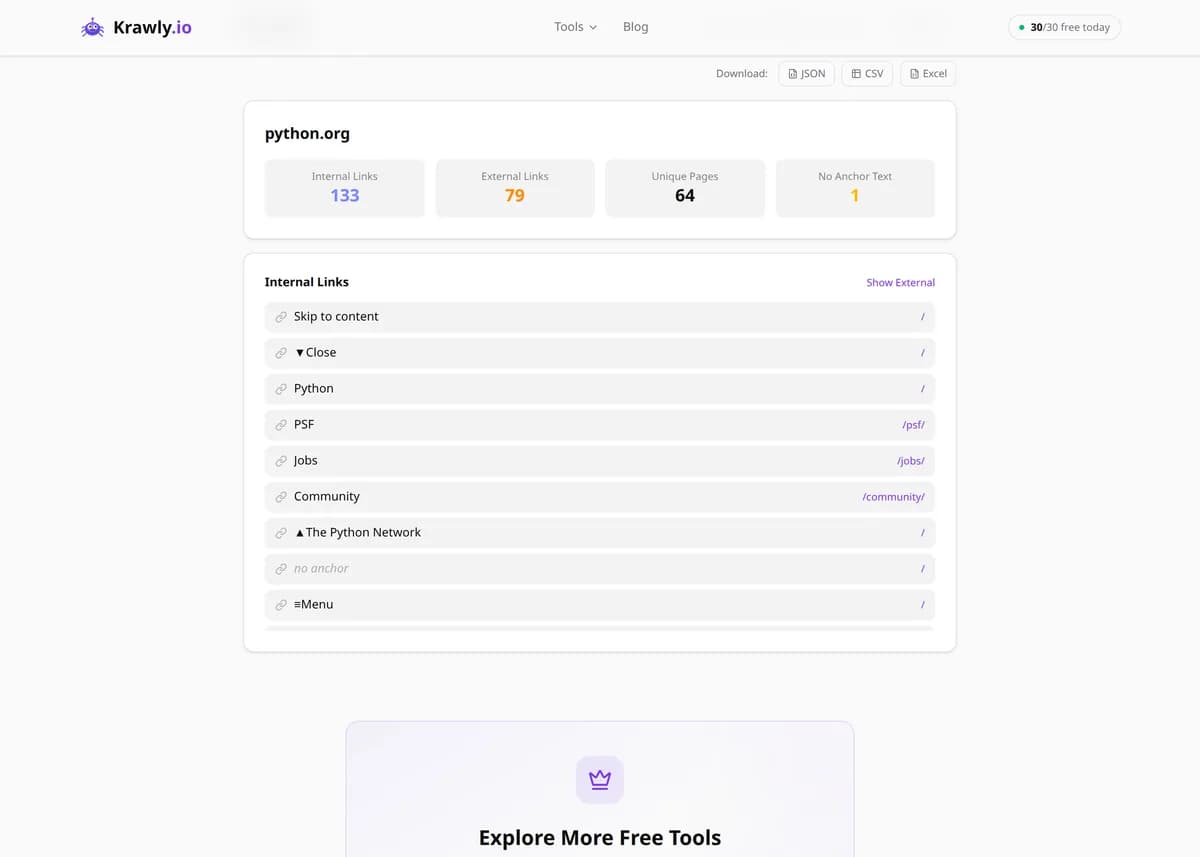
Enter a URL and the Internal Link Mapper crawls that single page and catalogs every link on it — separating internal from external, extracting each link's anchor text, flagging nofollow attributes, counting unique destination pages, and charting the link-depth distribution. It surfaces the two most common on-page linking problems: orphan anchors (links with no meaningful text, like bare icons) that waste ranking signals, and thin internal linking that leaves important pages hard for Google to discover. Export the full map to JSON, CSV, or Excel to plan your internal-linking fixes.

Updated Krawly Editorial TeamIn-house engineers, writers & reviewers
Explore More Free Tools

Discover 150+ free tools for web scraping, SEO analysis, OSINT, and more. 30 free uses every day — no signup required.

150+ Free Tools No Signup Required JSON / CSV / Excel 30 Uses / Day
Quick answer

Enter a URL and the Internal Link Mapper crawls that single page and catalogs every link on it — separating internal from external, extracting each link's anchor text, flagging nofollow attributes, counting unique destination pages, and charting the link-depth distribution. It surfaces the two most common on-page linking problems: orphan anchors (links with no meaningful text, like bare icons) that waste ranking signals, and thin internal linking that leaves important pages hard for Google to discover. Export the full map to JSON, CSV, or Excel to plan your internal-linking fixes.

What is Internal Link Mapper?

The Internal Link Mapper crawls a webpage and maps all of its internal and external links, resolving each to a full URL and recording its anchor text, nofollow status, and place in the site's link-depth distribution. Internal links are how PageRank (link equity) flows through your site and how Google discovers and prioritizes pages, so understanding a page's outbound linking is central to SEO. The tool helps you find pages that need more internal links, spot anchors that carry no descriptive text, and see how link value is distributed — all exportable for deeper analysis.

How to use Internal Link Mapper

  1. 1

    Enter the page URL

    Paste the URL of the page whose links you want to map — your homepage and main category pages are the highest-value places to start, since they distribute the most internal link equity.

  2. 2

    Review the internal/external split

    The tool separates links that point to the same domain (internal) from those pointing elsewhere (external), resolving relative URLs to absolute ones so you see each true destination.

  3. 3

    Inspect anchor text and nofollow

    Check the anchor text on each link and note which carry a rel=nofollow attribute. Descriptive, keyword-relevant anchors pass context to the target page; nofollow links deliberately withhold ranking signals.

  4. 4

    Fix orphans and export

    Identify orphan anchors — links with empty or non-descriptive text — and rewrite them, then export the full map to JSON, CSV, or Excel to plan internal-linking improvements across the page.

Try it when you need to…

  • Try it when an important page won't rank and you suspect it isn't receiving enough internal links
  • Try it when auditing anchor text to replace vague 'click here' links with descriptive, keyword-relevant ones
  • Try it when you need to find and fix orphan anchors or accidental nofollow links leaking your internal link equity

Use cases

  • SEO audit — analyze a page's internal linking to improve crawlability and the flow of PageRank
  • Content strategy — find important pages that need more internal links pointing to them for better discoverability
  • Link-equity analysis — identify nofollow links and empty anchors that quietly waste link value
  • Site-architecture review — visualize link-depth distribution to understand how deep your key pages sit
  • Competitor research — study how a competitor's page structures and distributes its internal links

Key features

Separates internal and external links with full absolute-URL resolution
Extracts the anchor text of every link on the page
Detects rel=nofollow on each link
Reports unique destination-page count and link-depth distribution
Flags orphan anchors — links with no meaningful visible text
Exports the full link map to JSON, CSV, or Excel

Tips & best practices

Anchor text is a ranking signal: descriptive, keyword-relevant anchors tell Google what the target page is about, while generic anchors like 'click here' or 'read more' pass almost no context. Rewrite vague anchors on high-value internal links first.

Orphan anchors are usually image links, icon buttons, or logo links that wrap non-text elements — they still count as links but pass no textual signal. Add an aria-label or descriptive alt text so they're meaningful to both users and crawlers.

Adding rel=nofollow to an internal link stops it passing equity, which is almost never what you want internally. Reserve nofollow for untrusted external links (user-generated content, paid links) — nofollow-ing your own navigation quietly starves your pages of ranking signal.

This maps one page at a time, not the whole site. To model true site-wide flow, run it on your key hub pages (homepage, category pages, top articles) and combine the exports — those pages control where most of your internal equity goes.

Frequently asked questions

No — it analyzes one page at a time. For a site-wide picture, run it on your most important pages (homepage, category pages, key articles) and combine the results, since those hub pages control the bulk of your internal link distribution.

Any link whose destination is on the same domain as the URL you entered is classified as internal; links to any other domain are external. Relative links are resolved to their full absolute URL first, so the classification reflects the true destination.

Image links, icon buttons, and links that wrap non-text elements often have no visible anchor text, so they're flagged as orphan anchors. They still function as links but pass no textual context to the target — adding an aria-label or descriptive alt text fixes this for both users and search engines.

Internal links do two jobs: they help search engines discover and crawl your pages, and they distribute PageRank (link equity) between pages, signalling which are most important. Well-linked pages get crawled more often and tend to rank better, while poorly-linked pages can become effectively invisible to search.

Generally no. A nofollow attribute tells search engines not to pass ranking signal through that link, which starves your own pages when applied internally. Reserve nofollow for untrusted external links such as user-generated content or paid placements; keep internal navigation and content links followable.

It shows how the page's links are spread across the site's structure — how many point to shallow, high-priority pages versus deeper ones. Important pages buried many clicks deep receive less equity and get crawled less, so the distribution helps you spot pages that should be linked more prominently.