Extract all comments from a YouTube video with likes and reply counts.
Paste a YouTube video URL and the Comment Scraper pulls the video's public top-level comments — including author, like count, reply count, and timestamp — into a clean, exportable list. It reads the same comment feed YouTube loads in the browser, so no API key or sign-in is required, and it works on any video that has comments enabled and is publicly viewable. Use it for sentiment analysis, FAQ mining, market research, and moderation review.
63 Free Tools No Signup Required JSON / CSV / Excel 30 Uses / Day
Quick answer
Paste a YouTube video URL and the Comment Scraper pulls the video's public top-level comments — including author, like count, reply count, and timestamp — into a clean, exportable list. It reads the same comment feed YouTube loads in the browser, so no API key or sign-in is required, and it works on any video that has comments enabled and is publicly viewable. Use it for sentiment analysis, FAQ mining, market research, and moderation review.
What is YouTube Comment Scraper?
The YouTube Comment Scraper lets you scrape YouTube comments from any public video without needing the official Data API or a login. It collects the comment text, author name, like count, reply count, and the relative timestamp for each comment, then returns everything as structured data you can filter, sort, or export. It's built for people who want the raw voice-of-the-audience data behind a video rather than scrolling through it manually.
How to use YouTube Comment Scraper
1
Copy the video URL
Grab the full URL of the YouTube video whose comments you want — the standard youtube.com/watch?v=… link, a youtu.be short link, or a Shorts URL all work.
2
Paste it into the scraper
Drop the URL into the input field and run the tool. It resolves the video ID and starts pulling the public comment feed the same way the YouTube page loads it.
3
Review and sort the comments
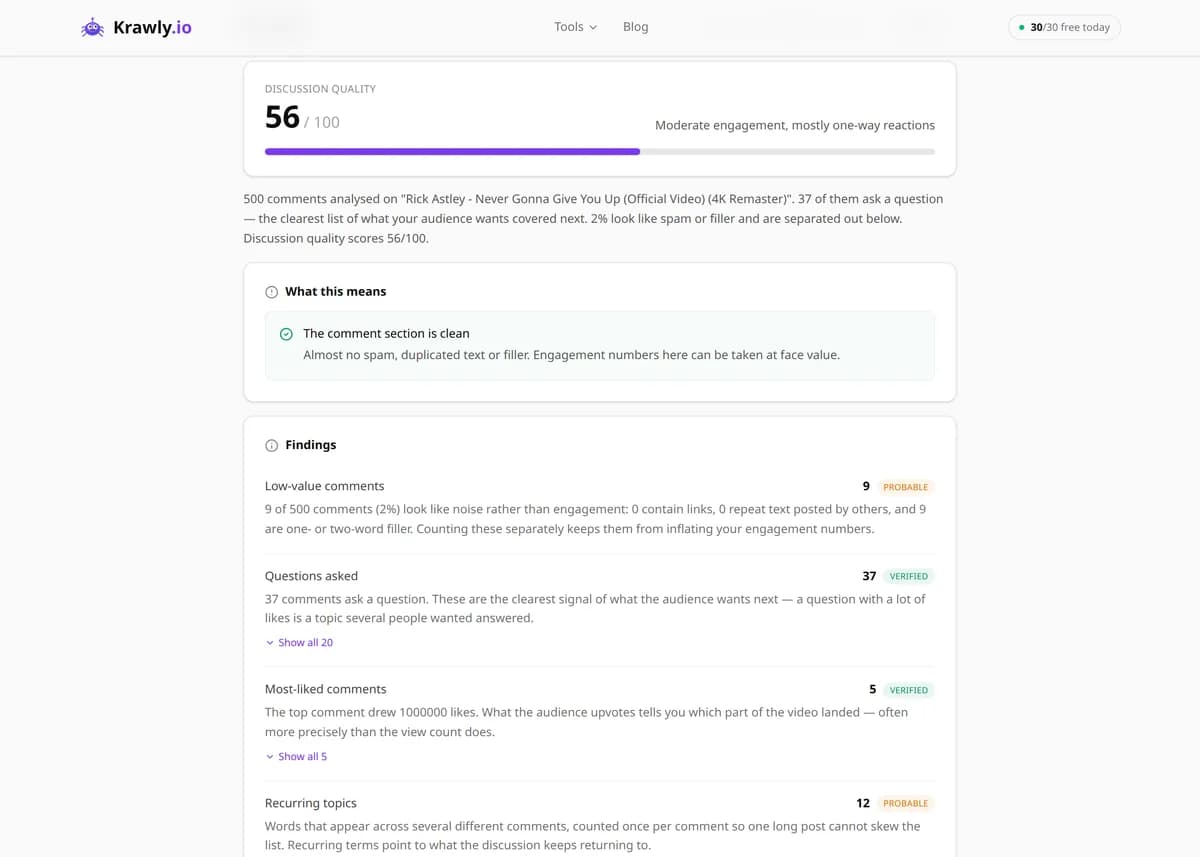
Results come back with author, text, like count, reply count, and timestamp. Sort by likes to find the top comments, or scan chronologically to see early reactions.
4
Export for analysis
Download the results as JSON or CSV and drop them into a spreadsheet, a sentiment-analysis notebook, or your own script for deeper text mining.
Try it when you need to…
Try it when you want to know how audiences really reacted to a video before you comment, respond, or reference it
Try it when you need to pull the most-liked questions from a popular video to plan a follow-up or a pinned answer
Try it when you're researching a product or competitor and want unfiltered buyer opinions instead of curated reviews
Use cases
Sentiment analysis — gauge whether reaction to a launch, trailer, or review skews positive or negative
FAQ mining — surface the questions viewers ask repeatedly so you can answer them in a pinned comment or follow-up video
Product and market research — read unfiltered opinions about a product, service, or competitor from real buyers
Content ideation — spot recurring requests and objections that become your next video topics
Moderation and community review — export comments so a team can screen for spam, abuse, or brand-safety issues offline
Key features
✓Extracts public top-level comments from any video with comments enabled
✓Captures like counts and reply counts so you can rank comments by engagement
✓Includes author display name and the comment's relative timestamp
✓Handles high-comment videos by paginating through the comment feed
✓Exports results as structured JSON (and CSV) for spreadsheets, sentiment tools, or scripts
Tips & best practices
YouTube's default comment order is "Top comments," a relevance ranking driven mostly by likes and replies — not strict chronology. If you need the earliest reactions, sort your exported data by timestamp rather than trusting the on-page order.
Like and reply counts are the single best signal of which comments actually resonated. When you export, sort by likes first — the top 1–2% of comments usually captures the dominant sentiment and the most-asked questions.
Comments can be disabled by the creator, limited on videos marked "made for kids," or held for review — in those cases the feed will be empty or partial, and that's a YouTube-side restriction, not a tool failure.
For sentiment work, remember that engagement is skewed: the loudest commenters are not a representative sample of all viewers. Treat comment sentiment as a directional signal, not a statistically clean survey.
Frequently asked questions
No. The tool reads the same public comment data YouTube serves to browsers, so there's no API key, quota, or sign-in involved. That also means it isn't bound by the YouTube Data API's daily quota limits.
The tool focuses on top-level comments and reports how many replies each one has. Reply threads are nested under their parent on YouTube, so the reply count tells you which conversations are worth opening manually.
Up to 500 comments per run. It pages through the video's public comment feed, top/most-relevant comments first, so on very busy videos you get the 500 most prominent comments rather than every single one.
The most common reasons are that the creator disabled comments, the video is marked "made for kids" (which limits or removes comments), the video is private/unlisted-without-access, or comments are held for review. Any of these produces an empty result.
By default YouTube serves comments in "Top" (relevance) order, weighted by likes and replies, not by date. If chronological order matters, export the data and re-sort by the timestamp field yourself.
Comments posted publicly on a video are published, publicly accessible data, and reading them is generally permissible. How you use the data is what matters — respect privacy laws like GDPR when storing personal data (author names), and don't use it to harass individuals or spam.
Yes. The YouTube comments scraper free tier needs no signup, API key, or Google account — anonymous use is limited to 30 runs per day rather than paywalled. Each run returns comment text, author, likes, reply count, and timestamp, so you can collect YouTube comments for free for research, FAQ mining, or moderation review.
Yes, for the comments themselves. After a run you can download the comment list as CSV, Excel, or JSON, which gives you free YouTube comments exports for spreadsheets, sentiment tools, or archives. It does not download the video, its audio, or its captions — only the public comment data and engagement counts.
No. The tool only reads comments that viewers have already posted publicly; it never posts, generates, or buys comments and can't add engagement to any video. If you're looking for free comments on YouTube to boost a video, that's outside what it does — and fake engagement breaks YouTube's policies anyway.