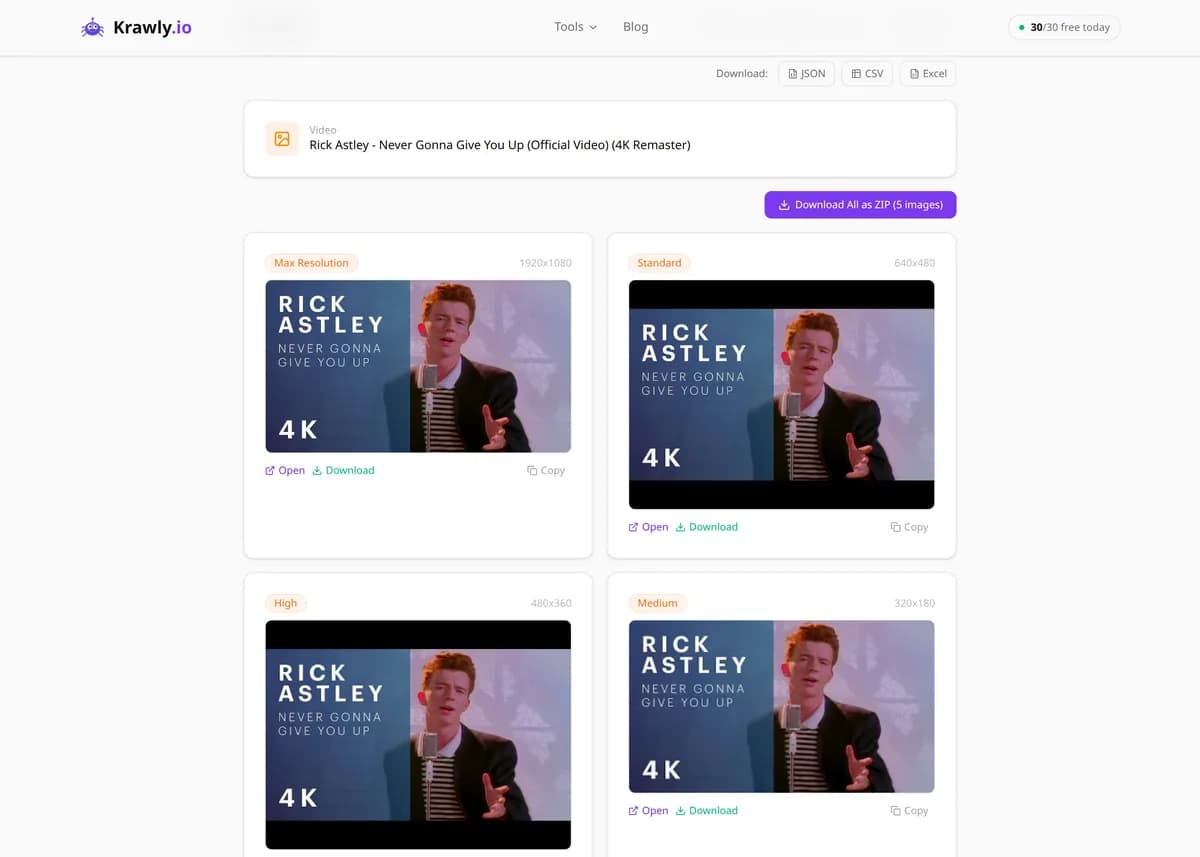
Get all thumbnail images of a YouTube video in every resolution.
To download a YouTube thumbnail, paste the video URL (a youtube.com/watch, youtu.be or Shorts link) into the box above. The tool lists every size YouTube serves — Max Resolution, Standard, High, Medium and Default — and each one opens or downloads as a JPG directly from img.youtube.com. It's free, needs no signup, and allows 30 lookups per day.
63 Free Tools No Signup Required JSON / CSV / Excel 30 Uses / Day
Quick answer
To download a YouTube thumbnail, paste the video URL (a youtube.com/watch, youtu.be or Shorts link) into the box above. The tool lists every size YouTube serves — Max Resolution, Standard, High, Medium and Default — and each one opens or downloads as a JPG directly from img.youtube.com. It's free, needs no signup, and allows 30 lookups per day.
What is YouTube Thumbnail Downloader?
The YouTube Thumbnail Downloader is a free tool that shows every thumbnail image YouTube keeps for a video and lets you save each one as a JPG. Paste a video link and you get the video title plus five versions of its thumbnail: Max Resolution (maxresdefault, 1280×720, or 1920×1080 when YouTube has it), Standard (640×480), High (480×360), Medium (320×180) and Default (120×90). Every image comes straight from YouTube's own image server, img.youtube.com, so the file you download is the same one YouTube shows in search results and embeds — not a screenshot and not a recompressed copy. It's the quickest way to get YouTube thumbnail images at full size without digging through page source.
How to use YouTube Thumbnail Downloader
1
Copy the video link
Open the video on YouTube and copy its address. Regular youtube.com/watch?v= links, short youtu.be links and youtube.com/shorts/ links all work, so a link from your phone's share menu is fine too.
2
Paste it and run the tool
Paste the link into the input box and submit. The tool reads the video ID from the URL and returns the video title together with every thumbnail size YouTube has for that video.
3
Pick a resolution
Choose Max Resolution for the sharpest image — 1280×720, or 1920×1080 when it exists. If a video has no max-resolution version, Standard (640×480) or High (480×360) is the next best choice.
4
Open or save the JPG
Click the size you want to open it from img.youtube.com, then save it, or download it directly. The file is a standard JPG that opens in any browser, image viewer or editor.
Try it when you need to…
Try it when you need the full-size thumbnail of your own video and the original design file is lost
Try it when you want to save YouTube thumbnail images for a blog post, slide deck or newsletter that links to the video
Try it when you're studying competitor thumbnails and need them at full size, not as tiny search-result previews
Try it when right-clicking on YouTube only gives you a small, low-quality preview image
Try it when you want to see how a thumbnail holds up at every size YouTube uses, from 120×90 up to HD
Use cases
Recovering your own artwork — get back the exact thumbnail you uploaded when the source file is gone
Linking to a video — use its thumbnail as a clickable preview image in an article or email that points to the video
Design research — collect high-resolution thumbnails from top videos in your niche to study layout, text and color
Presentations and reports — drop a crisp video preview into slides or a campaign report
Record keeping — keep a copy of how a thumbnail looked, since creators often swap thumbnails after publishing
Key features
✓All five sizes YouTube serves: Max Resolution, Standard, High, Medium and Default
✓YouTube thumbnail HD support — maxresdefault at 1280×720, or 1920×1080 when available
✓Images load straight from img.youtube.com as JPG — no re-encoding, no watermark
✓Shows the video title so you can confirm you've got the right video
✓Accepts youtube.com/watch, youtu.be and YouTube Shorts links
✓Free with no signup or account — 30 lookups per day per IP address
Tips & best practices
If the Max Resolution image isn't available, the video simply has no max-resolution version. This is common on older or low-resolution uploads; use Standard (640×480) instead.
Standard (640×480) and High (480×360) are 4:3 sizes, while Max Resolution and Medium (320×180) are 16:9. Pick a 16:9 size when you need a widescreen image without cropping.
Thumbnails belong to the creators who made them. Linking to or discussing a video is one thing; reusing someone else's thumbnail in your own designs, ads or products needs their permission.
Making your own thumbnail? Don't upscale a small downloaded image. Use our YouTube Thumbnail Resizer (/convert/youtube-thumbnail-resizer) to turn your own artwork into a clean 1280×720 image.
Creators sometimes change a thumbnail after upload. If you need the current one, run a fresh lookup instead of reusing a file you saved earlier.
Frequently asked questions
Copy the video link, paste it into the YouTube Thumbnail Downloader and submit. You'll see the title and every available size. Click the one you want — Max Resolution gives the best quality — and it opens or downloads as a JPG from img.youtube.com. No account, extension or software is needed.
Sometimes. The Max Resolution (maxresdefault) image is 1280×720 for most videos and 1920×1080 when YouTube has a larger version. A YouTube thumbnail 1080p file only exists if YouTube stores one; the tool shows whatever YouTube actually serves rather than upscaling a smaller image.
Not every video has one. Some older uploads and videos uploaded at low resolution only have the smaller sizes. In that case Standard (640×480) is the largest image available, and the other sizes — High, Medium and Default — still work normally.
Yes. Paste a youtube.com/shorts/ link the same way as a regular video link. The tool reads the video ID from the URL and returns the same set of thumbnail sizes, so you can grab a Short's cover image as easily as a long video's.
Yes. There's no signup, no account and no watermark. To keep the service fair for everyone, each IP address can run up to 30 lookups per day, which is plenty for normal research or for saving your own thumbnails.
They're JPG files, delivered directly from YouTube's image server at img.youtube.com. Krawly doesn't re-encode or watermark them, so you get exactly the image YouTube stores for each size, ready to open in any image viewer or editor.
A thumbnail is the creator's work and is protected by copyright. Downloading your own thumbnails is no problem. For someone else's, ask the creator before reusing it in your own content, ads or products. When in doubt, link to the original video instead.
Yes. It runs in any mobile browser, so a YT thumbnail download on your phone takes the same steps: copy the link from the YouTube app's share menu, paste it here and tap the size you want. The JPG then opens or saves through your browser.