YouTube Free · no signup

YouTube Video Downloader

Get direct download URLs for any public YouTube video, in every resolution and bitrate. Audio-only formats included for music and podcasts.

Paste any public YouTube video URL and the tool returns the full list of downloadable formats — every resolution YouTube offers (4K, 1080p, 720p, 480p, 360p, 240p) plus audio-only streams (M4A, WebM, Opus) for music and podcasts. Each row is a direct CDN link you can save with one click. We never re-host the video; the link points to YouTube's own infrastructure.

Enis Getmez avatarReviewed by Enis GetmezFounder & Lead Engineer·Updated

Explore More Free Tools

Discover 160+ free tools for web scraping, SEO analysis, OSINT, and more. 30 free uses every day — no signup required.

160+ Free Tools No Signup Required JSON / CSV / Excel 30 Uses / Day
Quick answer

Paste any public YouTube video URL and the tool returns the full list of downloadable formats — every resolution YouTube offers (4K, 1080p, 720p, 480p, 360p, 240p) plus audio-only streams (M4A, WebM, Opus) for music and podcasts. Each row is a direct CDN link you can save with one click. We never re-host the video; the link points to YouTube's own infrastructure.

What is YouTube Video Downloader?

The YouTube Video Downloader is a free online tool that exposes the direct download URLs YouTube itself serves for any public video. It works for full videos, audio-only streams (great for music, lectures, and podcast episodes), and Shorts. We use yt-dlp under the hood — the same library the open-source community relies on — so the tool stays current with YouTube's player changes and supports every resolution YouTube offers without converting or re-encoding anything ourselves.

How to use YouTube Video Downloader

  1. 1

    Copy the YouTube URL

    Open the video on youtube.com or youtu.be and copy the URL from the address bar. youtu.be short links and bare 11-character video IDs are also accepted.

  2. 2

    Paste it into the tool

    Drop the URL into the input box and click Analyze. Results appear within 5-10 seconds depending on YouTube's response time.

  3. 3

    Pick the format you want

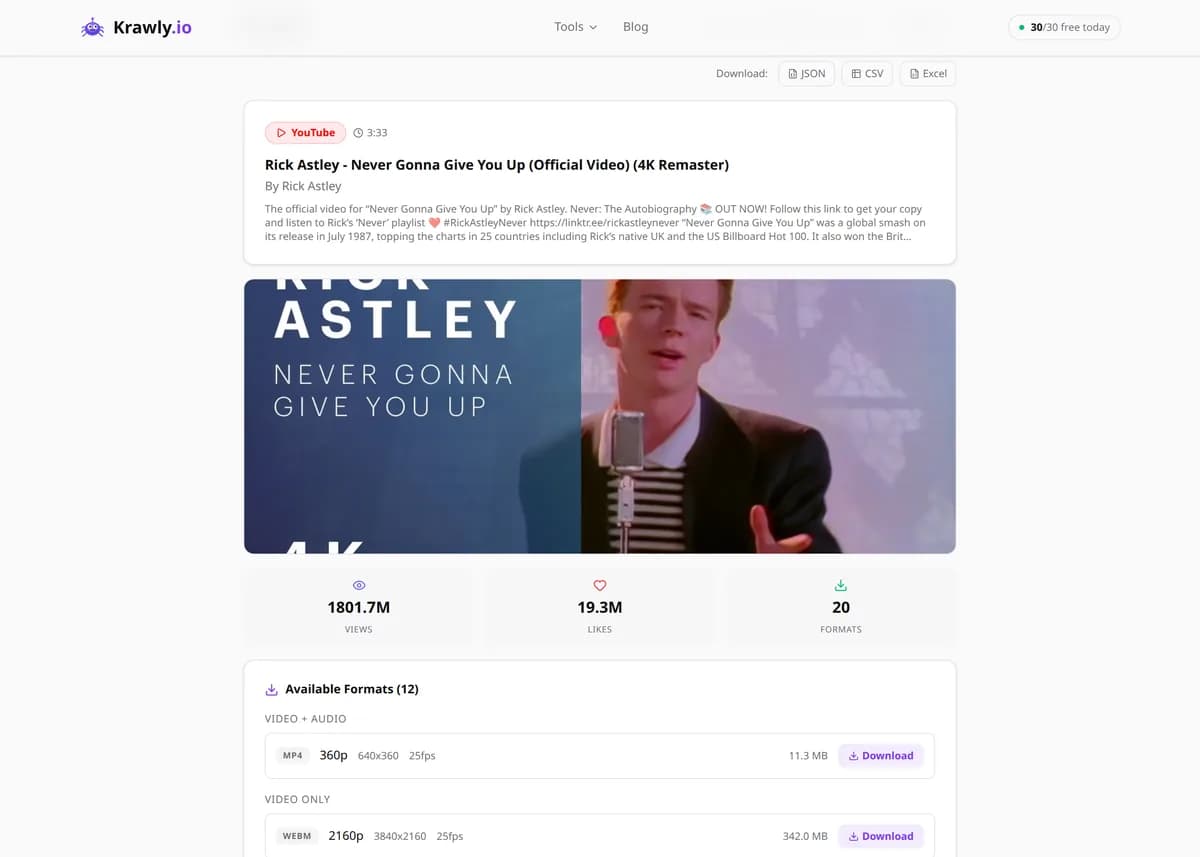
    The result table lists every available format — 4K, 1080p60, 720p, 480p, 360p, plus audio-only M4A and Opus streams. Each row shows resolution, filesize estimate, codec, and frame rate. Pick the highest one your device or storage can handle.

  4. 4

    Click the direct URL to download

    The URL column is a direct link to YouTube's CDN. Right-click → Save As, or paste into a download manager. The tool does not proxy the file through our servers — you download straight from YouTube.

Try it when you need to…

  • Save your own YouTube uploads as offline backups before changing channels
  • Archive Creative Commons or public-domain footage for editing in Premiere/DaVinci
  • Pull audio-only podcasts from YouTube to listen offline on a long flight
  • Download lecture videos for classes that allow offline study
  • Extract a high-bitrate audio track from a music video for personal use

Use cases

  • Personal archive of your own YouTube uploads
  • Offline access to Creative Commons educational content
  • Audio-only extraction for podcasts and music study
  • Frame-accurate clip downloading for fair-use commentary or criticism
  • Backup of public-domain documentaries and archival footage

Key features

Every resolution YouTube serves (up to 4K when available)
Audio-only streams (M4A, Opus, WebM) for podcasts and music
Direct CDN URLs — no re-hosting, no re-encoding, no watermark
Filesize estimate per format so you can budget your data
Codec, frame rate, and bitrate shown on every row
Supports full URLs, youtu.be short links, and bare video IDs

Tips & best practices

Pick the format with both video + audio if you want a playable file. Audio-only and video-only rows are separate streams — most players need them merged for normal playback.

1080p60 files for a 4-minute video are typically 50-80 MB. 4K can easily exceed 300 MB. Check the filesize column before downloading on metered data.

If the URL expires after a few hours, that's normal — YouTube's signed URLs have a short TTL. Re-run the tool to get fresh links.

If a video is region-restricted, age-gated, or private, the tool will return an error explaining which gate it hit. Public videos work; logged-in-only content does not.

Frequently asked questions

It depends on the video and your jurisdiction. Downloading your own uploads, Creative Commons content, and material covered by fair-use / private-copy exceptions is generally fine. Downloading copyrighted material to redistribute is not. YouTube's Terms of Service also forbid downloading content without permission — even when the law would technically allow it. Use the tool only for content you have the right to download.

YouTube serves video and audio as separate streams above 360p — this is how DASH (Dynamic Adaptive Streaming) works. Rows marked vcodec=none are audio-only; rows marked acodec=none are silent video. To play a downloaded high-resolution file with sound, either pick a combined row (typically 360p) or merge the streams with ffmpeg.

Yes. YouTube Shorts URLs (youtube.com/shorts/...) are detected and processed identically to regular videos.

YouTube's CDN signs each download URL with a short-lived token (typically a few hours). If your download fails after a delay, just re-run the tool to get a fresh URL — the metadata is the same.

No — we don't proxy the file, you download directly from YouTube. Whatever YouTube serves is what you get. A 4K hour-long video could be 4+ GB.

We dropped the universal social-media downloader because the legal and Terms-of-Service situation is messier on those platforms, anti-scraping protections break it frequently, and most users wanting it were doing things we did not want to help with. YouTube is the one case where archiving your own uploads and Creative Commons content has clear legitimate use.