Developer Free · no signup

GitHub Profile Analyzer

Analyze GitHub user profiles: repos, followers, top projects, bio, and contribution summary.

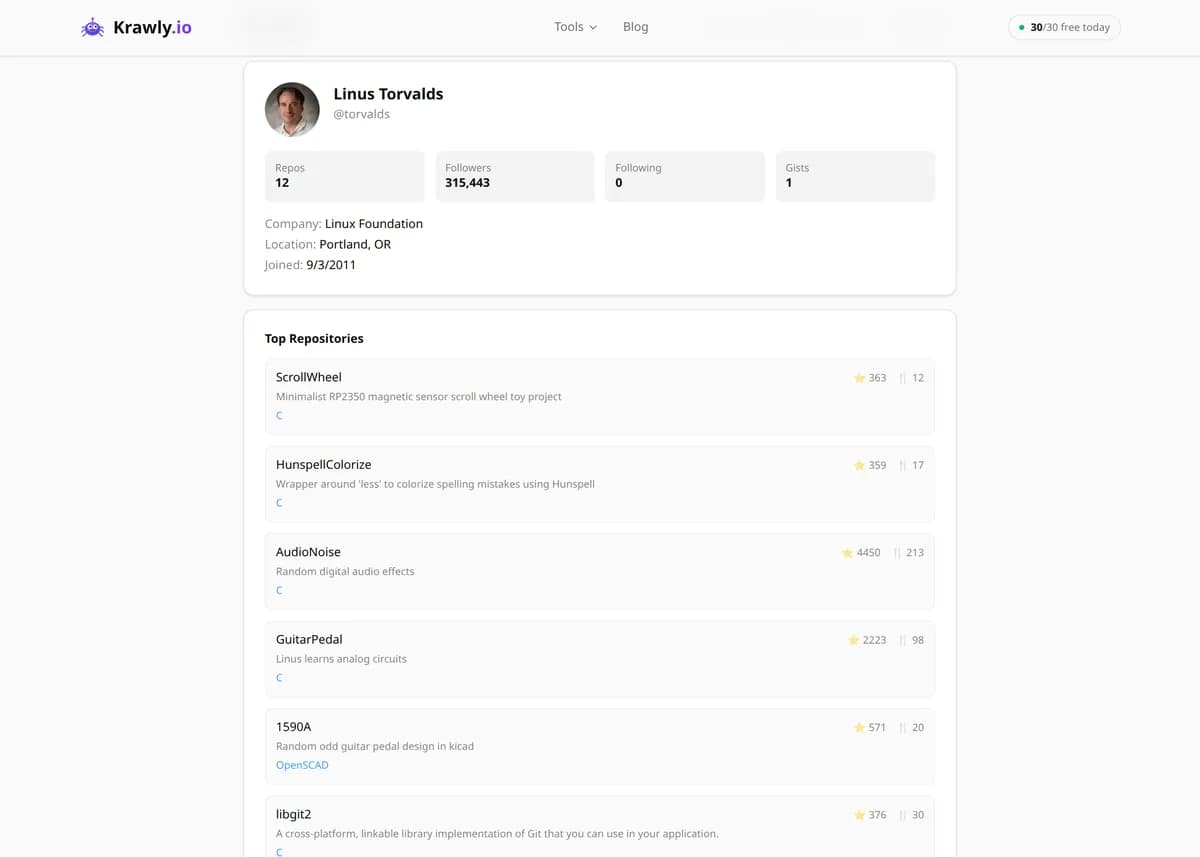
Enter a GitHub username and the GitHub Profile Analyzer pulls that developer's public data from the GitHub API — bio, company, location, follower and following counts, public repository count, account age, and their top repositories ranked by stars — into one clean overview. Instead of clicking through tabs, you get an at-a-glance read on how active a developer is, what languages and projects they're known for, and how their work is received by the community. It's built for hiring research, open-source due diligence, and quick developer profiling.

Updated Krawly Editorial TeamIn-house engineers, writers & reviewers
Explore More Free Tools

Discover 150+ free tools for web scraping, SEO analysis, OSINT, and more. 30 free uses every day — no signup required.

150+ Free Tools No Signup Required JSON / CSV / Excel 30 Uses / Day
Quick answer

Enter a GitHub username and the GitHub Profile Analyzer pulls that developer's public data from the GitHub API — bio, company, location, follower and following counts, public repository count, account age, and their top repositories ranked by stars — into one clean overview. Instead of clicking through tabs, you get an at-a-glance read on how active a developer is, what languages and projects they're known for, and how their work is received by the community. It's built for hiring research, open-source due diligence, and quick developer profiling.

What is GitHub Profile Analyzer?

The GitHub Profile Analyzer retrieves and summarizes the public information about any GitHub user via the official GitHub API. It surfaces the account's bio, company, location, blog/website, follower and following counts, total public repositories, join date, and a ranked list of the user's most-starred repositories with their primary languages and star counts. Recruiters, engineering managers, and open-source maintainers use it to size up a developer's activity, expertise, and community standing in seconds — all from publicly available data, no scraping of private repos or contributions.

How to use GitHub Profile Analyzer

  1. 1

    Enter the GitHub username

    Type the exact handle (the part after github.com/). It's case-insensitive, but must be the account's login name, not their display name or email.

  2. 2

    Review the profile summary

    The tool returns the user's bio, company, location, follower/following counts, public repo total, and account creation date — a snapshot of who they are and how long they've been active on GitHub.

  3. 3

    Scan the top repositories

    See the user's most-starred public repositories with their primary language and star counts. This is the fastest signal of what the developer is known for and where their strongest work lives.

  4. 4

    Interpret the signals

    Read the numbers in context: high follower counts and heavily-starred repos indicate community influence, while a steady stream of public repos over several years indicates sustained activity rather than a dormant account.

Try it when you need to…

  • Try it when you're screening a developer candidate and want a fast, honest read on their public work
  • Try it when you're about to depend on an open-source package and want to vet the maintainer behind it
  • Try it when you need to identify the most influential developers in a specific technology community

Use cases

  • Hiring research — evaluate a candidate's real, public code output and community standing beyond their resume
  • Open-source due diligence — check the maintainer behind a library you're about to depend on
  • Developer profiling — quickly understand a contributor's expertise and primary languages
  • Community outreach — identify influential developers in a technology niche by followers and stars
  • Contribution tracking — get a high-level overview of a developer's public repository portfolio

Key features

Full public profile summary — bio, company, location, website, and join date
Follower and following counts as a signal of community reach
Total public repository count and account age
Top repositories ranked by star count, with each repo's primary language
Powered by the official GitHub API — accurate, structured, no scraping

Tips & best practices

Stars and followers measure visibility, not code quality — a viral awesome-list can outstar years of serious engineering. When evaluating a hire, open the top repos and look at the actual code, commit history, and issue handling, not just the numbers.

Public repo count excludes private work. Many senior engineers do most of their coding in private company repos, so a low public count is not evidence of inactivity — weigh it against account age and the quality of what is public.

The unauthenticated GitHub API is rate-limited (roughly 60 requests per hour per IP), so if a lookup fails or returns nothing, you may have hit the limit — wait and retry rather than assuming the profile doesn't exist.

Account age plus a long tail of small forked repos can indicate a learner or a bot; a smaller number of original, well-starred repos usually signals a more serious contributor. Read the shape of the portfolio, not just its size.

Frequently asked questions

No. The tool only retrieves publicly available information through the GitHub API. Private repositories, private contribution activity, and any data the user has chosen not to make public are never accessed or shown.

Directly from the official GitHub REST API, which returns structured, up-to-date public profile and repository data. Because it's the API rather than page scraping, the figures — followers, repo counts, stars — match exactly what GitHub reports.

Not necessarily. Stars reflect a repository's popularity and followers reflect visibility, but a highly-starred project can be a simple list or tutorial, while excellent engineering can sit in low-profile or private repos. Use the counts as a starting signal, then read the actual code.

Most professional coding happens in private company repositories that GitHub keeps hidden, so a low public count usually reflects where someone works rather than how much they code. Judge public output alongside account age and the quality of the visible projects.

The most common cause is the unauthenticated GitHub API rate limit (about 60 requests per hour per IP). If you've run several lookups quickly, wait a while and try again. Also double-check you entered the account's login handle, not a display name or email.

It focuses on profile-level and repository-level public data — bio, counts, and top repositories by stars. GitHub's contribution graph is a separate, page-rendered feature; for deep commit-by-commit history, view the individual repositories directly on GitHub.