Discover the digital footprint of any email address — Gravatar, GitHub, social profiles, email provider, and disposable email detection.
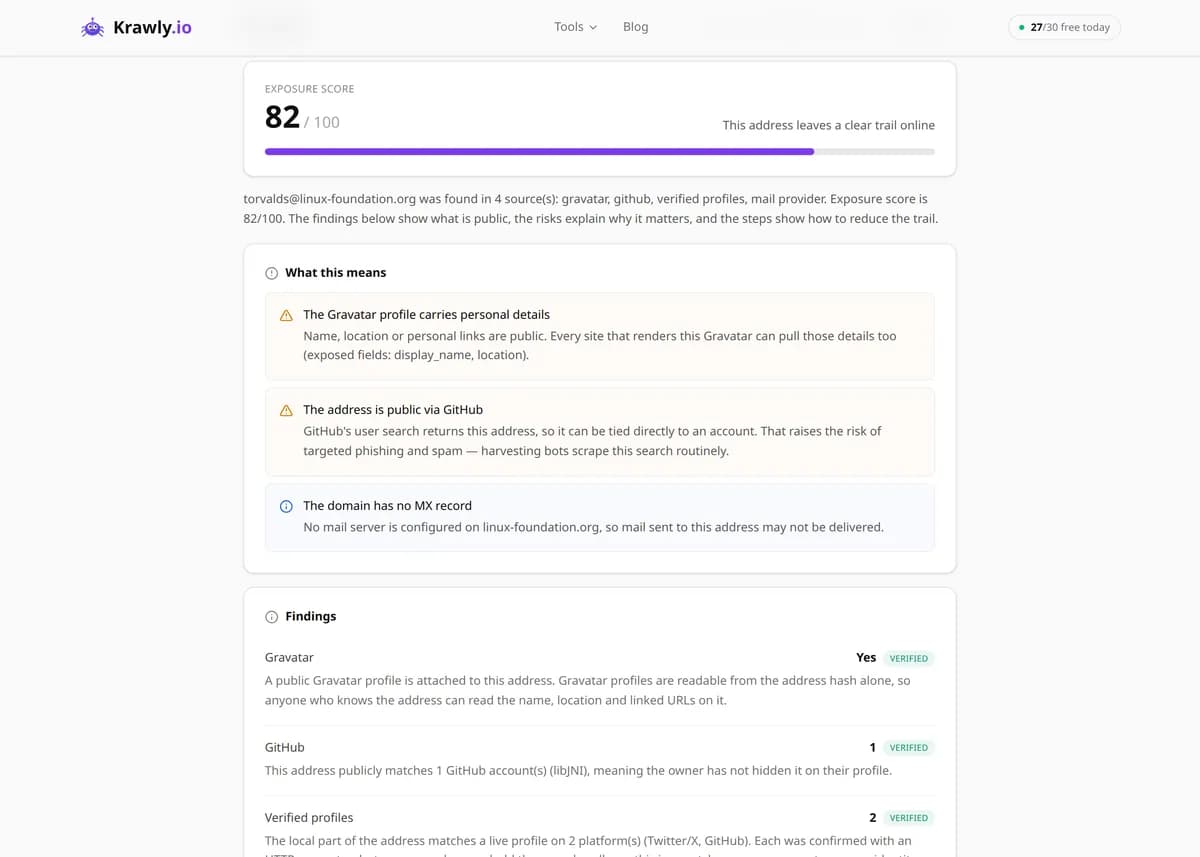
Enter an email address and this email footprint checker gathers the public traces linked to it: a Gravatar avatar and profile if one exists, any GitHub account registered with that address, the mail provider behind the domain's MX records, whether the address is disposable, and candidate social-media profiles verified for existence. It draws only on public APIs and DNS — nothing private, no breach data, no hacking. Use it for lead enrichment, fraud screening, and identity research, and treat low-certainty matches as leads to confirm, not facts. Only investigate addresses you have a legitimate reason to look into.
63 Free Tools No Signup Required JSON / CSV / Excel 30 Uses / Day
Quick answer
Enter an email address and this email footprint checker gathers the public traces linked to it: a Gravatar avatar and profile if one exists, any GitHub account registered with that address, the mail provider behind the domain's MX records, whether the address is disposable, and candidate social-media profiles verified for existence. It draws only on public APIs and DNS — nothing private, no breach data, no hacking. Use it for lead enrichment, fraud screening, and identity research, and treat low-certainty matches as leads to confirm, not facts. Only investigate addresses you have a legitimate reason to look into.
What is Email Footprint Finder?
Email Footprint Finder is an OSINT tool that maps the email digital footprint of a single address — the public traces tied to it. From one address it queries Gravatar for a linked avatar and profile, searches the GitHub public API for accounts registered with that email, inspects the domain's MX records to identify the mail provider, flags disposable/throwaway addresses, and generates likely social-media profile URLs that it then verifies with a lightweight request. Every signal comes from publicly available services and open APIs — it's an aggregator of open-source intelligence, not a breach lookup or a private-data service.
How to use Email Footprint Finder
1
Enter the email address
Type or paste the address you're researching. Make sure you have a legitimate reason to look it up — enrichment of your own leads, fraud checks on your own signups, or authorised investigation.
2
Run the footprint scan
The tool hashes the address for Gravatar, queries the GitHub public API, resolves the domain's MX records, and checks it against disposable-domain lists — all in parallel from public sources.
3
Read the confirmed signals first
Gravatar hits, a matched GitHub account, and the identified mail provider are high-confidence, directly-sourced facts. Start with these before anything inferred.
4
Verify the low-certainty leads
Generated social-profile URLs are guesses based on the username portion and only tell you a profile exists, not that it's the same person. Open and confirm each one manually before trusting it.
Try it when you need to…
Try it when you want to enrich a business lead with a real avatar, GitHub profile, and verified social links before outreach
Try it when a signup or order looks suspicious and you want to know if the address is disposable or tied to a public identity
Try it when you're running authorised OSINT and need a fast, public-source starting map of an email's footprint
Use cases
OSINT investigations — build a picture of the public presence attached to an email address
Lead enrichment — attach an avatar, GitHub profile, and likely social links to a business contact
Fraud and abuse screening — flag disposable or throwaway addresses at signup or checkout
Identity verification — cross-check an address against known public profiles before you engage
Sales research — learn what a prospect has published publicly before reaching out
Key features
✓Gravatar profile and avatar lookup by email hash
✓GitHub account discovery via the public commit/user API
✓Mail-provider detection from MX records (Google Workspace, Microsoft 365, Zoho, Proton, iCloud, Yahoo, Yandex)
✓Disposable / temporary email detection against known throwaway domains
✓Candidate social-profile URL generation with HEAD-request verification
✓Certainty labels (low / medium) so you know which matches are confirmed vs. inferred
Tips & best practices
A matched username is not a matched identity. 'jsmith' on GitHub and 'jsmith@…' can easily be different people — treat generated profile links as leads to verify, never as proof.
Only investigate addresses you have a lawful, legitimate basis to research — your own customers, your own leads, or authorised casework. Aggregating public data on individuals can still fall under GDPR/CCPA, and mass-profiling or stalking is both unethical and often illegal.
A Gravatar hit is one of the strongest signals here because the person deliberately linked that email to a public profile — it's opt-in public data, unlike guessed social URLs.
Disposable-address detection is great for spotting throwaway signups, but a Gmail or Outlook address isn't automatically trustworthy — free providers are used by real customers and fraudsters alike, so combine this with other checks.
Frequently asked questions
No. It queries only publicly available services and open APIs — Gravatar, the GitHub public API, and public DNS/MX records — plus lightweight existence checks on public profile URLs. It never accesses inboxes, passwords, breach dumps, or any protected data, and it can't reveal anything the person hasn't made public.
Aggregating publicly available data is generally lawful, but 'public' doesn't mean 'unrestricted'. Privacy laws like GDPR and CCPA can apply to how you collect and store data about identifiable people, so you should have a legitimate purpose — enriching your own leads, screening your own signups, or authorised investigation — and avoid using it for harassment, stalking, or profiling strangers. Use it responsibly and within the law of your jurisdiction.
Those URLs are constructed from the email's username and then checked with a HEAD request. A successful response upgrades certainty to 'medium', meaning a profile with that handle exists — but it does not confirm the profile belongs to the same person. Different people frequently reuse the same username across platforms, so always verify manually.
From the domain's MX records it recognises Google Workspace, Microsoft 365, Zoho, ProtonMail, iCloud, Yahoo, and Yandex. Domains using self-hosted or less common mail servers are labelled 'Unknown' rather than guessed.
A sparse result usually means the person simply hasn't linked that address to public services — no Gravatar, no GitHub account under it, and no matching public handles. That's a normal, privacy-respecting outcome, not an error; many people keep their primary address off public platforms.
It compares the address's domain against maintained lists of known temporary and throwaway providers (Mailinator, Guerrilla Mail, 10-minute-mail services, and similar). A match tells you the address is likely short-lived and unreliable for long-term contact — useful for filtering fake signups, though not proof of bad intent.
Email footprinting is the OSINT practice of mapping what an address reveals in public: a linked avatar, developer accounts, the mail provider behind the domain, and handles that match its username. This tool automates that first pass, so you can map a digital footprint by email in seconds instead of checking Gravatar, GitHub, and DNS records by hand.
It's free to run without signing up, within a daily usage limit. But it's an email-based digital footprint finder, not a full person search: it doesn't look up names, phone numbers, home addresses, or breach records. It starts from one address and reports only the public footprint email accounts leave on Gravatar, GitHub, DNS, and matching profile URLs.