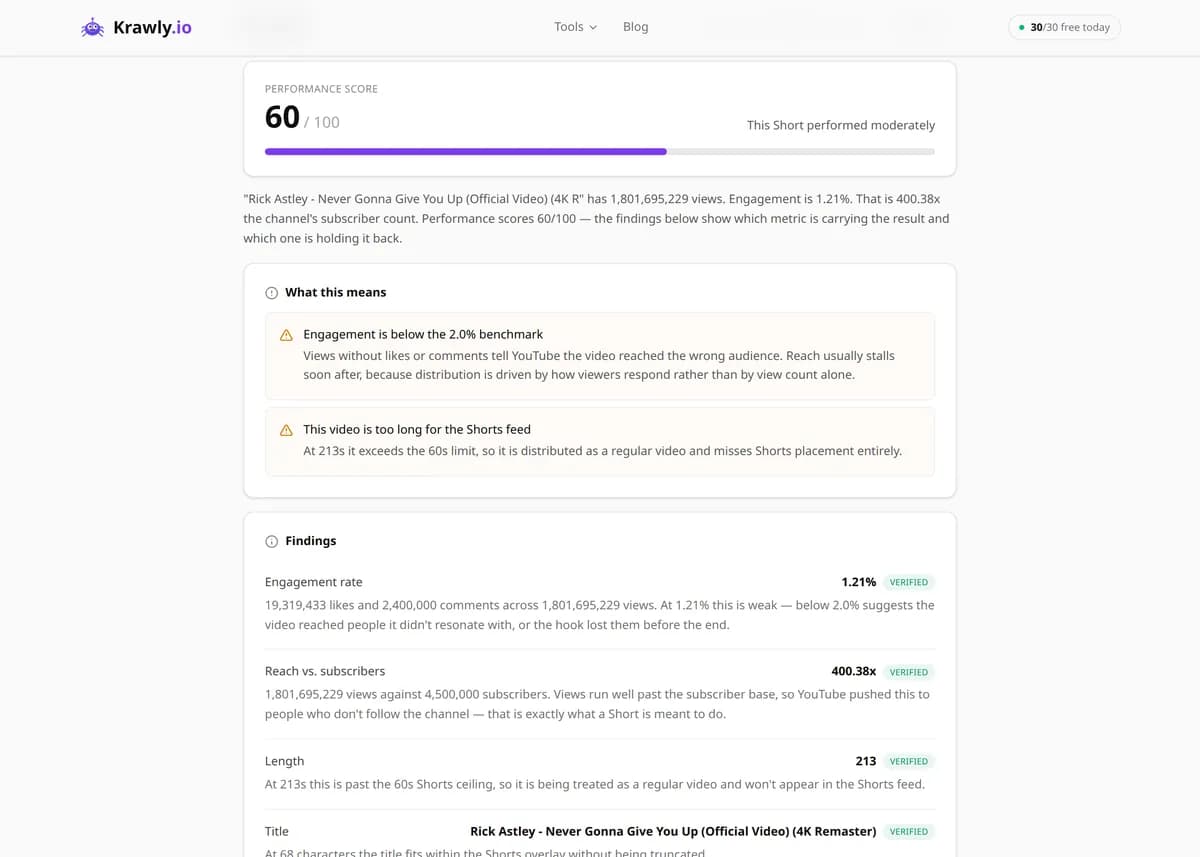
Paste a YouTube Shorts (or regular video) URL and the analyzer pulls the video's metadata and engagement metrics — views, likes, comments, engagement rate, channel details, tags, and category — into one YouTube Shorts analysis report. It auto-detects Shorts by flagging videos of 60 seconds or less, computes engagement rate as (likes + comments) ÷ views, and exports to JSON, CSV, or Excel. Use it to benchmark your Shorts against competitors, find which formats and tags perform, and audit a channel's short-form strategy.
63 Free Tools No Signup Required JSON / CSV / Excel 30 Uses / Day
Quick answer
Paste a YouTube Shorts (or regular video) URL and the analyzer pulls the video's metadata and engagement metrics — views, likes, comments, engagement rate, channel details, tags, and category — into one YouTube Shorts analysis report. It auto-detects Shorts by flagging videos of 60 seconds or less, computes engagement rate as (likes + comments) ÷ views, and exports to JSON, CSV, or Excel. Use it to benchmark your Shorts against competitors, find which formats and tags perform, and audit a channel's short-form strategy.
What is YouTube Shorts Analyzer?
The YouTube Shorts Analyzer works as a YouTube Short analyzer for any Short or regular video, returning its full performance profile — views, likes, comments, a calculated engagement rate, channel info, tags, category, and upload date. It automatically flags whether a video is a Short based on its duration, so you can compare short-form and long-form performance side by side. It's built for creators, marketers, and analysts who want a YouTube Short analysis backed by the numbers behind a video, not just the on-screen counter.
How to use YouTube Shorts Analyzer
1
Copy the Short's URL
Grab the link to the Short or video you want to analyze — a youtube.com/shorts/… URL, a standard watch link, or a youtu.be short link all work.
2
Paste it into the analyzer
Drop the URL in and run it. The tool resolves the video, reads its public metadata, and pulls the engagement counters.
3
Read the performance profile
You get views, likes, comments, the computed engagement rate, channel details, tags, and category — plus a flag telling you whether the video qualifies as a Short.
4
Export and compare
Download the report as JSON, CSV, or Excel and stack multiple videos side by side to benchmark formats, creators, or your own catalog over time.
Try it when you need to…
Try it when you want to benchmark your Short's engagement rate against a competitor's viral clip
Try it when you're auditing whether a channel's Shorts or long-form videos actually drive more engagement
Try it when you need the exact view, like, and comment numbers behind a Short to build a performance report
Use cases
Shorts performance analysis — track views, likes, comments, and engagement rate on your own short-form content
Competitor research — pull the same metrics on rival creators' Shorts to see what's working in your niche
Content optimization — study which tags and categories cluster around high-performing Shorts
Channel audit — compare a channel's Shorts against its long-form videos to see where engagement is strongest
Trend spotting — identify the short-form formats and hooks that are driving outsized views
Key features
✓Full video metadata: title, description, and upload date
✓Channel info including subscriber count and verification status
✓Engagement metrics — views, likes, comments, and a calculated engagement rate
✓Tag and category extraction for content and SEO analysis
✓Automatic Shorts detection based on video duration (≤ 60 seconds)
✓Export results as JSON, CSV, or Excel
Tips & best practices
The tool flags Shorts by duration (≤ 60 seconds), which is the technical rule of thumb — but YouTube itself decides Shorts placement using duration plus aspect ratio (vertical, roughly 9:16) and the #Shorts signal. A 55-second vertical clip is a Short; a 55-second landscape clip usually isn't surfaced in the Shorts feed.
Engagement rate here is (likes + comments) ÷ views × 100, which is deliberately conservative because Shorts rack up enormous view counts. A 2–5% rate that would be excellent for long-form is normal-to-good for Shorts, so benchmark Shorts against other Shorts, not against regular videos.
Views on Shorts and long-form aren't counted identically — a Shorts "view" can register from a very brief watch as the feed auto-scrolls, which inflates raw view counts relative to long-form. Keep that in mind when comparing the two.
Tags carry far less SEO weight than they used to; YouTube leans on title, description, and on-screen/spoken content for ranking. Treat extracted tags as a hint to a creator's intended keywords, not as a ranking silver bullet.
Frequently asked questions
YouTube Shorts are short, vertical videos of 60 seconds or less shown in the swipeable Shorts feed. The analyzer works on both, but automatically flags anything ≤ 60 seconds as a Short so you can filter your dataset accordingly.
Engagement rate = (likes + comments) ÷ views × 100. It's a conservative measure because Shorts accumulate very high view counts, so a rate that looks low next to a long-form video can still be strong for short-form content.
The tool uses the ≤ 60-second rule as its flag, but YouTube's own Shorts classification also considers vertical aspect ratio and the #Shorts signal. So a short landscape video may not appear in the Shorts feed even though it's under a minute.
Yes — results download as JSON, CSV, or Excel, which makes it easy to stack multiple videos in a spreadsheet and compare formats, creators, or time periods.
No. It reads the video's publicly available metadata directly, so there's no API key, OAuth, or daily quota limit involved.
Creators can hide like counts, disable comments, or restrict a video, and videos marked "made for kids" limit comments. When a metric is hidden or disabled by the uploader, it can't be read and the engagement rate is computed from whatever counters remain public.
Studio shows the channel owner private data such as retention, viewed-vs-swiped-away rate, traffic sources, and revenue. This tool is a public-data YouTube Shorts analytics checker: it reads what anyone can see — views, likes, comments, tags, channel details — and adds an engagement rate. That makes it useful for competitors' Shorts, but it can't replace Studio for your own retention data.
No. The analyzer only reads public numbers; it never adds likes, views, comments, or subscribers to any video. What this YT Shorts analyzer can do for free is show the like count, comment count, and engagement rate of any Short, so you can see which hooks, tags, and formats earn likes organically and apply that to your own content.
This analyzer gives you an objective read rather than an opinion: views, likes, comments, engagement rate, tags, category, and whether the video counts as a Short. It doesn't score creativity, editing, or thumbnail quality. The most useful verdict comes from comparing your engagement rate with similar Shorts in your niche — run theirs through the tool too.