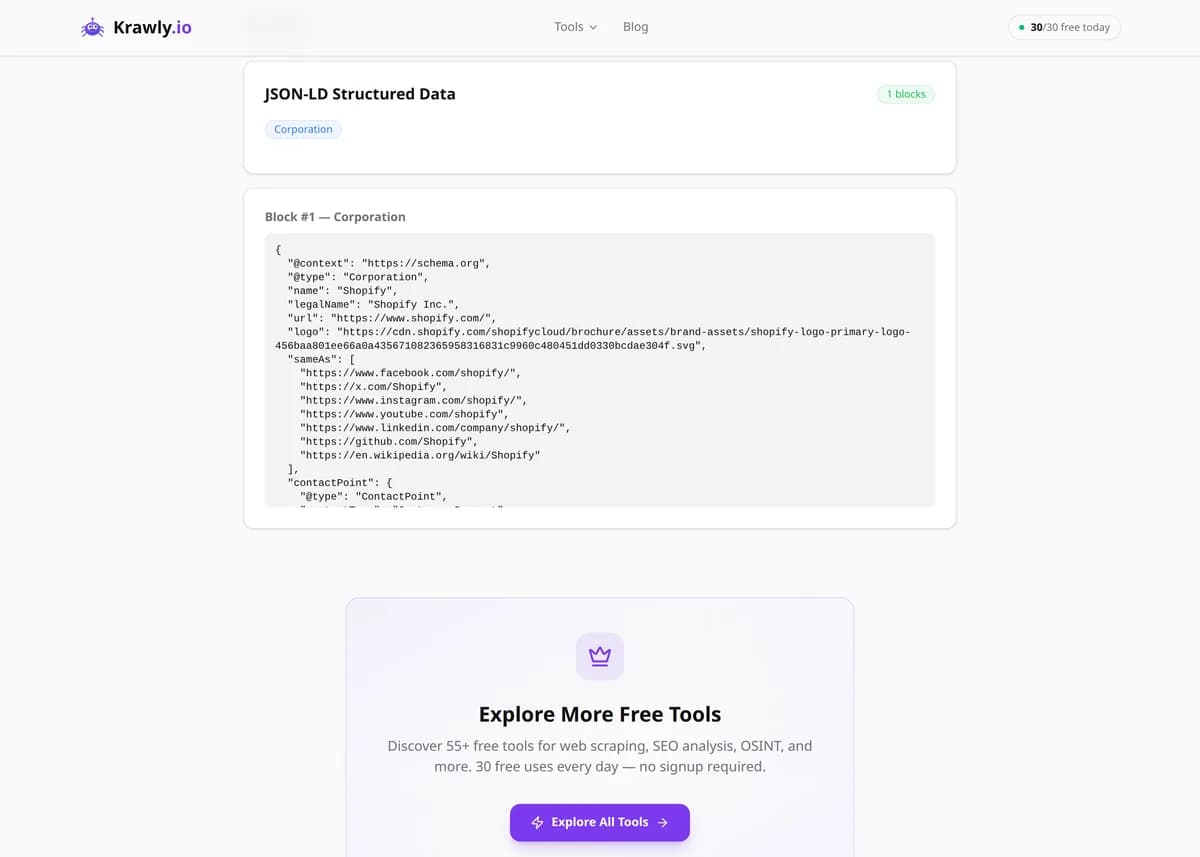
Extract all JSON-LD structured data blocks from any webpage. See schema types and data.
Paste a URL and the JSON-LD Extractor pulls out every <script type="application/ld+json"> block on the page, parses each one, and shows you the schema.org @type, the full property tree, and the raw JSON side by side. Because JSON-LD is Google's preferred format for structured data, this is the quickest way to confirm your Product, Article, FAQPage, or Breadcrumb markup is actually present, well-formed, and carrying the fields rich results require. It reveals errors that silently disqualify a page from rich snippets — missing required properties, broken JSON, or the wrong @type.
63 Free Tools No Signup Required JSON / CSV / Excel 30 Uses / Day
Quick answer
Paste a URL and the JSON-LD Extractor pulls out every <script type="application/ld+json"> block on the page, parses each one, and shows you the schema.org @type, the full property tree, and the raw JSON side by side. Because JSON-LD is Google's preferred format for structured data, this is the quickest way to confirm your Product, Article, FAQPage, or Breadcrumb markup is actually present, well-formed, and carrying the fields rich results require. It reveals errors that silently disqualify a page from rich snippets — missing required properties, broken JSON, or the wrong @type.
What is JSON-LD Extractor?
The JSON-LD Extractor finds and parses all JSON-LD structured-data blocks embedded in a webpage and displays their schema types, properties, and raw source. JSON-LD (JavaScript Object Notation for Linked Data) is the format Google recommends for describing entities like products, articles, recipes, events, and organizations so search engines can generate rich results. Rather than digging through page source by hand, you get a clean breakdown of every block, its @type, and its fields — making it easy to audit rich-snippet eligibility, debug markup, and see exactly what structured data a competitor is shipping.
How to use JSON-LD Extractor
1
Enter the page URL
Paste the URL of the page whose structured data you want to inspect — a product page, blog post, recipe, or event listing. The tool fetches the live HTML and locates every JSON-LD script tag in it.
2
Read the detected @types
Each block is labelled with its schema.org @type (e.g. Product, Article, FAQPage, BreadcrumbList). The @type determines which rich result the page is eligible for, so confirm it matches your intent.
3
Inspect the property tree
Expand each block to see its properties and nested values. Check that the fields Google requires for that type are present — for example a Product needs name, offers, and a price; an Article needs headline and datePublished.
4
Validate the raw JSON
Review the raw JSON view for syntax errors or malformed values. A single trailing comma or unescaped quote makes the whole block invalid, so if a block fails to parse, the raw view is where you'll spot why.
Try it when you need to…
Try it when a rich result disappeared from your listing and you need to see whether the JSON-LD is still valid
Try it before launching a product or article page to confirm the structured data has all required fields
Try it when you want to copy the schema strategy of a competitor who wins rich snippets in your niche
Use cases
Rich-snippet audit — confirm a page carries valid Product, Article, FAQ, or Recipe markup before requesting indexing
Structured-data debugging — find out why a rich result stopped showing by inspecting the live JSON-LD
Schema.org type verification — check that the correct @type is used and no conflicting blocks are present
Competitor analysis — see exactly which schema types and properties competitors mark up to win rich results
Metadata extraction — pull product, article, or organization data straight from a page's structured data
Key features
✓Extracts every JSON-LD block on the page, including multiple and nested @graph structures
✓Identifies the schema.org @type of each block at a glance
✓Renders both a parsed property tree and the raw JSON source
✓Reports the total block count so you can spot duplicate or conflicting markup
✓Works on any public page with no API key required
Tips & best practices
The extractor reads JSON-LD present in the served HTML. If your structured data is injected client-side by JavaScript (e.g. via Google Tag Manager), a raw fetch may not see it — Google renders JS, but confirm your markup is in the rendered DOM, not just the source.
Extracting valid JSON-LD proves the markup exists and parses, but not that it qualifies for a rich result. Google also enforces content guidelines and required/recommended properties — pair this tool with Google's Rich Results Test before assuming eligibility.
Watch for multiple blocks with conflicting @types on one page (e.g. two different Product blocks). Search engines can get confused, so consolidate related entities into a single @graph where possible.
A block that appears empty or fails to parse almost always has a JSON syntax error — a trailing comma, an unescaped quote inside a string, or a stray newline. The raw view pinpoints the offending line.
Frequently asked questions
JSON-LD (JavaScript Object Notation for Linked Data) is a way to encode structured data as JSON inside a <script type="application/ld+json"> tag. It describes entities on a page — products, articles, events, organizations — using the schema.org vocabulary, and it's the format Google explicitly recommends for eligibility for rich results.
The most common reason is that the markup is added client-side by JavaScript rather than being in the initial HTML the server sends. A basic fetch sees the raw source, so if your JSON-LD is injected by a tag manager or framework after load, it may not appear. Confirm the markup is in the rendered DOM.
No. Valid, well-formed markup is necessary but not sufficient. Google also requires specific properties per type, enforces content quality and structured-data guidelines, and ultimately decides algorithmically whether to show a rich result. This tool confirms the markup is present and parseable; Google's Rich Results Test confirms eligibility.
It reads whatever @type is declared in each block, so it works with any schema.org type — Product, Article, NewsArticle, FAQPage, Recipe, Event, BreadcrumbList, Organization, LocalBusiness, and hundreds more, including nested @graph structures.
Yes, and it's very common. A single page might carry a BreadcrumbList, an Organization, and a Product block separately, or combine them in one @graph. The tool reports the total count so you can spot duplicates or conflicts that might confuse search engines.
All three encode structured data, but JSON-LD keeps it in a self-contained script block separate from your visible HTML, whereas Microdata and RDFa embed attributes directly into your page's tags. Google prefers JSON-LD because it's easier to add, maintain, and inject without touching the page layout.