Web Scraping Free · no signup

Source Code Viewer

View page source with tag statistics. Analyze scripts, styles, meta tags, and HTML structure.

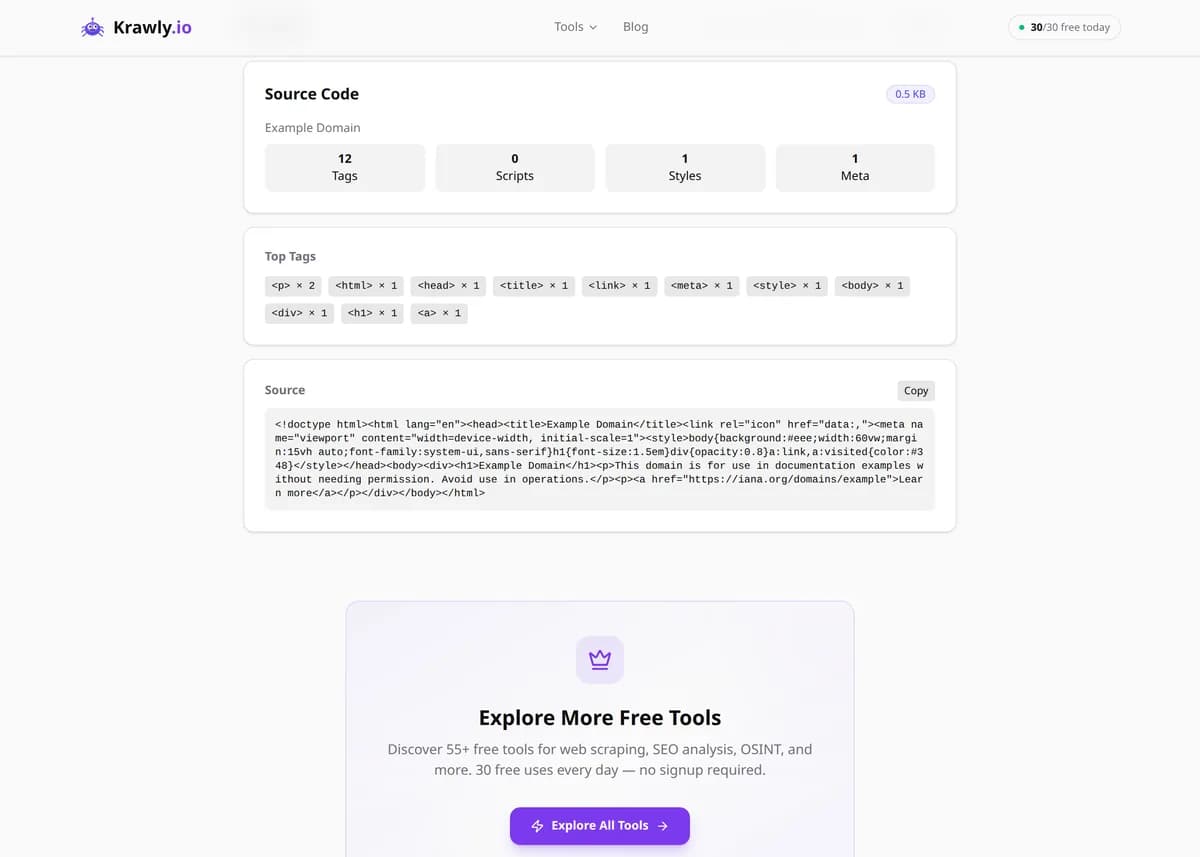
Enter a URL and Source Code Viewer returns the page's raw HTML exactly as the server sends it, plus stats: total tag count, number of script and style tags, and the source size. This is the pre-JavaScript source — what 'View Source' shows and what search engines and social crawlers see first — which makes it ideal for checking meta tags, structured data, and how much a page leans on client-side scripts. It shows the initial HTML, not the DOM after JavaScript runs, so for dynamically rendered content you'll still want browser DevTools.

Updated Krawly Editorial TeamIn-house engineers, writers & reviewers
Explore More Free Tools

Discover 150+ free tools for web scraping, SEO analysis, OSINT, and more. 30 free uses every day — no signup required.

150+ Free Tools No Signup Required JSON / CSV / Excel 30 Uses / Day
Quick answer

Enter a URL and Source Code Viewer returns the page's raw HTML exactly as the server sends it, plus stats: total tag count, number of script and style tags, and the source size. This is the pre-JavaScript source — what 'View Source' shows and what search engines and social crawlers see first — which makes it ideal for checking meta tags, structured data, and how much a page leans on client-side scripts. It shows the initial HTML, not the DOM after JavaScript runs, so for dynamically rendered content you'll still want browser DevTools.

What is Source Code Viewer?

Source Code Viewer fetches the raw, server-delivered HTML of any webpage and displays it in full, alongside quick statistics about what the page is made of. It counts total tags, tallies <script> and <style> elements, and reports the overall source size, giving you an instant read on how heavy and how script-dependent a page is. This is the HTML the server sends before the browser runs any JavaScript — the same thing you'd get from 'View Source' — which makes it the right lens for SEO checks, competitor research, and debugging what search engines and social crawlers actually receive.

How to use Source Code Viewer

  1. 1

    Enter the page URL

    Paste the full URL of the page whose source you want to inspect. The tool sends a plain request and captures the HTML the server returns.

  2. 2

    Scan the statistics

    Check the tag count, script/style counts, and source size first — they tell you at a glance how large and how script-heavy the page is before you dig into the markup.

  3. 3

    Read the raw source

    Browse the full HTML to confirm meta tags, canonical links, Open Graph data, and JSON-LD structured data are actually present in what the server sends.

  4. 4

    Copy for deeper analysis

    Use one-click copy to pull the whole source into an editor, a diff tool, or an SEO checklist for closer review or comparison over time.

Try it when you need to…

  • Try it when you need to confirm that meta tags, canonical links, or JSON-LD are present in the HTML a crawler receives
  • Try it when you suspect a page is client-side rendered and want to see the sparse pre-JavaScript source
  • Try it when you want to study how a competitor structures its markup and how many scripts it loads

Use cases

  • HTML debugging — inspect the raw markup a server actually returns
  • SEO auditing — verify meta tags, canonical links, and JSON-LD are present in the source
  • Competitor analysis — study how a rival structures its pages and what scripts it loads
  • Development — confirm a deploy shipped the markup and tags you expected
  • Crawler-view checks — see the pre-render HTML that Googlebot and social scrapers receive first

Key features

Full raw HTML source display, exactly as delivered by the server
Total tag count for a quick sense of page complexity
Script and style tag counts to gauge client-side dependency
Source size reporting to spot bloated pages
One-click copy of the entire source to your clipboard

Tips & best practices

This shows the pre-JavaScript source, so if the page you view in a browser looks far richer than the source here, the site is client-side rendered — that's a critical SEO signal, since crawlers that don't execute JS may see the same sparse HTML you do.

A high script-tag count with very little visible markup usually means a single-page app (React/Vue/Angular) where the real content is injected at runtime — worth flagging in an SEO audit.

Use it to confirm structured data actually ships: paste the source into Google's Rich Results Test, or search it for 'application/ld+json' to verify your JSON-LD is present in the server response, not just added later by a tag manager.

Compare the source size and tag count against a competitor's to gauge relative page weight and complexity — a leaner source often correlates with faster first paint.

Frequently asked questions

No. Source Code Viewer shows the initial HTML the server sends, before any JavaScript executes. Content that a framework injects into the DOM after load won't appear here. To inspect the fully rendered page, use your browser's DevTools 'Inspect' panel, which reflects the live DOM rather than the original source.

'View Source' and this tool show the raw response from the server — the pre-render HTML. The DevTools Elements panel shows the current DOM, which JavaScript may have heavily modified. For SEO and crawler questions the raw source matters most, because that's what many bots parse first; for debugging live UI, the DOM view is more useful.

Because the visible page is built at runtime by JavaScript. Single-page apps ship a small HTML shell plus scripts, then populate the content client-side. A tiny source with many script tags is the signature of this pattern — and a heads-up that JS-dependent crawlers may see very little content.

The total tag count is a rough proxy for page complexity and DOM size, which affects rendering performance. The script and style counts show how much the page depends on client-side code and external assets — high numbers often mean heavier load times and more render-blocking resources to investigate.

It works on any page that returns publicly accessible HTML. Pages requiring a login, a session, or that block automated requests may return an error or a challenge page instead of their real source. No authenticated or private content is retrieved.

Yes. A webpage's HTML source is sent to every visitor's browser by design and viewing it — via 'View Source' or a tool like this — is completely normal and legal. It only exposes what the server already publishes publicly; it does not access server-side code, databases, or anything protected.