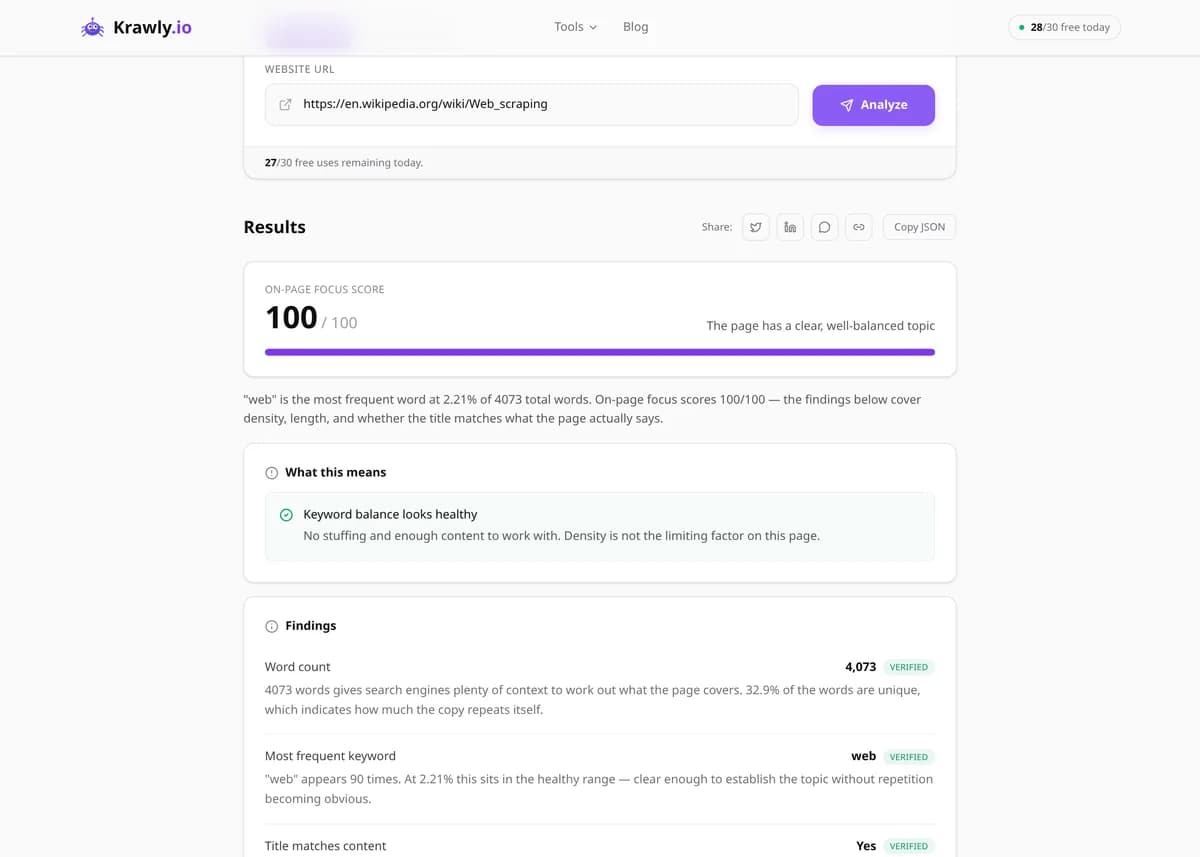
Analyze keyword frequency and density of any webpage.
To check keyword density, paste a page URL into the Keyword Density Checker. It extracts the page text and lists the most frequent words and two- and three-word phrases with their count and density, where density = occurrences ÷ total words × 100. Google publishes no ideal percentage, so use the results to confirm your topic is clearly covered and to spot over-repetition.
Pre-computed real result from running Keyword Density Analyzer against https://www.bbc.com/news
Counts how often each significant word and 2-3 word phrase appears on a page. Surfaces over-optimised keywords and natural topic clusters.
Word count
2,847
Unique words
1,103
Top 1-word
news (1.4%)
Top 2-word
bbc news (0.3%)
Top 3-word
watch live news (0.1%)
Stop-words filtered
Yes
What this tells you: Healthy density for a long-form page is 0.5-2% for your primary keyword. Anything above 4% reads as keyword-stuffed and gets quality-filtered by Google.
↓ Run the tool below with your own input
Actual Keyword Density Analyzer output — captured from a live run, not a mockup.
Explore More Free Tools
Discover 63 free public tools for web scraping, SEO analysis, OSINT, and more. 30 free uses every day — no signup required.
63 Free Tools No Signup Required JSON / CSV / Excel 30 Uses / Day
Quick answer
To check keyword density, paste a page URL into the Keyword Density Checker. It extracts the page text and lists the most frequent words and two- and three-word phrases with their count and density, where density = occurrences ÷ total words × 100. Google publishes no ideal percentage, so use the results to confirm your topic is clearly covered and to spot over-repetition.
What is Keyword Density Analyzer?
The Keyword Density Checker fetches a web page, extracts its readable body text and counts how often each word and each two- and three-word phrase appears. Every term is shown with its raw count and its density — the share of the page's total words it represents. Common stop words (the, and, of, a) are filtered out of the single-word list, so the terms that actually carry the topic rise to the top. Use it as a keyword density analyzer for your own pages, to check keyword density on a competitor's page, or to run a quick keyword density analysis after a rewrite. The goal isn't to hit a magic number; it's to confirm that your main topic is clearly present and that nothing is repeated so often it reads like keyword stuffing.
How to use Keyword Density Analyzer
1
Enter the page URL
Paste the URL of the page you want to analyze. The keyword density tool fetches the live HTML, removes scripts, styles, navigation, header and footer elements, and keeps the visible body text before counting.
2
Scan the top terms
Review the ranked list of single words. Your intended primary keyword should appear near the top; if it's buried or missing, the page isn't signaling the topic you think it is.
3
Read the two- and three-word phrases
Check the phrase lists to see the multi-word terms the page repeats. These usually match real search queries more closely than single words do.
4
Compare and revise
Run a competitor's URL alongside yours to benchmark, then edit your copy to add missing related terms or tone down an over-used one, and re-analyze to confirm the result reads naturally.
Try it when you need to…
Try it when a page targets a keyword but isn't ranking, and you want to verify the term actually appears in the copy
Try it when you fear a page reads as keyword-stuffed and want to measure whether any term is over-repeated
Try it when you want to reverse-engineer which phrases a competitor's ranking page emphasizes
Try it when a client asks how to check keyword density and you need a clear, shareable answer
Try it when you've rewritten a page and want to make sure the main topic survived the edit
Use cases
Confirm your target keyword and its close variants actually appear in the body copy after a rewrite, rather than assuming they do
Detect accidental keyword stuffing where a term repeats so often it reads unnaturally
Reverse-engineer a top-ranking competitor's page to see which primary and secondary phrases it emphasizes
Audit thin content where no single topic stands out, a sign the page lacks focus and topical depth
Verify a translated or localized page kept its key terms intact instead of paraphrasing them away
Key features
✓Single-word, two-word and three-word phrase (n-gram) frequency analysis
✓Density shown as both an absolute count and a percentage of total word count
✓Total and unique word counts for the analyzed text
✓Automatic stop-word filtering so meaningful terms rise to the top
✓Ranked lists of the most frequent terms and phrases on the page
✓Multi-URL support so you can compare your keyword profile against competitors
Tips & best practices
There is no density Google targets. Google ranks pages on relevance and usefulness, and a page can rank well with its main keyword well under 1% if the surrounding content is clearly on-topic.
Watch the two- and three-word phrases, not just single words. Ranking for 'italian leather boots' depends on that phrase appearing naturally, which single-word density can hide.
Add semantic variety instead of repeating the exact keyword. For a page about running shoes, terms like trainers, cushioning and marathon build topical depth that repeating 'running shoes' never will.
The checker drops nav, header, footer and aside elements, but menus or boilerplate built with other markup can still be counted. If a term ranks high only because it sits in repeated page furniture, it isn't strengthening the article.
Re-run the analysis after every major edit. A quick keyword density report before and after shows whether your changes moved the page toward a natural balance.
Frequently asked questions
Keyword density is the share of a page's words taken up by one keyword or phrase, expressed as a percentage. If a page has 800 words and 'trail running' appears 12 times, that phrase has a density of 1.5%. It's a simple way to see how strongly a page leans on a term.
The formula is: number of occurrences ÷ total words × 100. The checker counts all words in the extracted page text for the total, so a word that appears 10 times on a 500-word page shows 2%. Stop words are still part of the total, but they're filtered out of the single-word list.
There isn't an official one. Google has never published a target percentage, and its guidance focuses on writing helpful content for people. Some SEO guides suggest 1–2% for a primary keyword, but that's a rule of thumb, not a ranking factor. Use density as a sanity check, not a target.
It can. Repeating a keyword far beyond what reads naturally is keyword stuffing, which Google lists as a spam practice in its spam policies. It also makes the page worse to read. If one term's density stands out far above everything else, rewrite those passages for readers first.
Single words show which topics dominate the page. Two- and three-word phrases show the exact multi-word terms that repeat, which are closer to how people search. Phrases are only listed when they appear at least twice, and their densities are naturally lower than single words, since a longer phrase repeats less often.
Stop words are very common words like 'the', 'and', 'of', 'a' and 'to' that appear in almost every sentence and say little about the topic. Left in, they would crowd the top of the single-word list and hide the keywords that matter. The analyzer removes them from that list so meaningful terms surface.
As a diagnostic, yes; as a ranking lever, no. Google understands topics through context, synonyms and intent rather than a keyword ratio. A keyword density analysis is still useful to confirm your target term appears at all, to catch accidental stuffing, and to check that related terms give the page depth.
It reads the page's HTML, removes scripts, styles, comments and nav, header, footer and aside elements, and counts the remaining body text. That's close to the words a reader sees. Text hidden with CSS but still present in the HTML may be included, and hiding keywords that way is a spam risk anyway.