Analysis Free · no signup

SSL Certificate Checker

Check SSL certificate details, expiry, and security of any domain.

Enter a domain and the SSL Certificate Checker connects over HTTPS, retrieves the live certificate, and reports its issuer, subject, validity window, remaining days until expiry, covered hostnames (SANs), and whether the trust chain is complete. You instantly know if a site's HTTPS is valid, about to expire, or misconfigured — the three failures that trigger browser warnings and drive visitors away. No login or install; just paste and check.

Updated Krawly Editorial TeamIn-house engineers, writers & reviewers

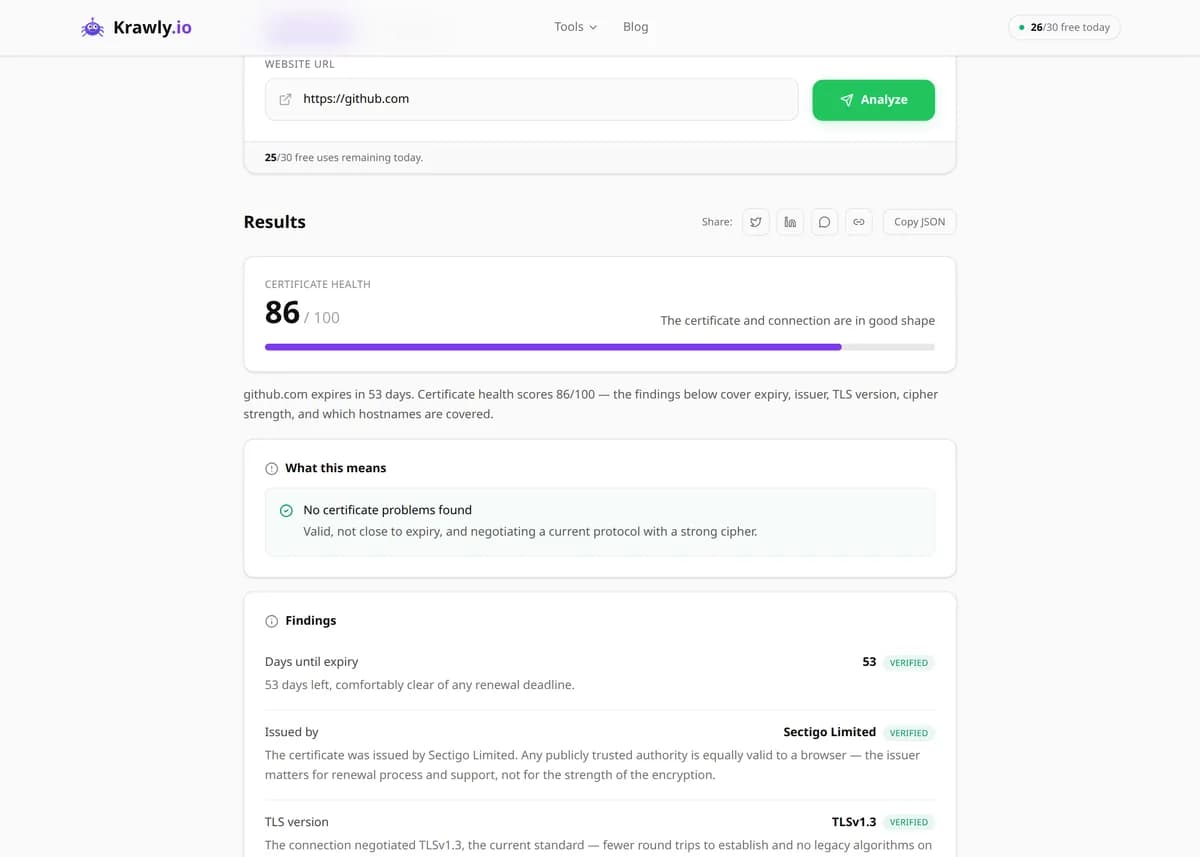
Example output

Pre-computed real result from running SSL Certificate Checker against https://github.com

Reports the SSL/TLS certificate chain, expiry, issuer, supported protocols, and security flags for any HTTPS domain.

Valid
Yes
Issuer
DigiCert TLS Hybrid ECC SHA384 2020 CA1
Expires in
287 days
TLS versions
1.2, 1.3
SAN entries
github.com, www.github.com, +9 others
HSTS
max-age=31536000; includeSubDomains; preload

What this tells you: GitHub's SSL setup is exemplary — HSTS preload, modern TLS 1.3, ECDSA cert. Use it as a reference for your own certificate hardening.

↓ Run the tool below with your own input
Explore More Free Tools

Discover 150+ free tools for web scraping, SEO analysis, OSINT, and more. 30 free uses every day — no signup required.

150+ Free Tools No Signup Required JSON / CSV / Excel 30 Uses / Day
Quick answer

Enter a domain and the SSL Certificate Checker connects over HTTPS, retrieves the live certificate, and reports its issuer, subject, validity window, remaining days until expiry, covered hostnames (SANs), and whether the trust chain is complete. You instantly know if a site's HTTPS is valid, about to expire, or misconfigured — the three failures that trigger browser warnings and drive visitors away. No login or install; just paste and check.

What is SSL Certificate Checker?

The SSL Certificate Checker verifies the SSL/TLS certificate presented by any domain over a live HTTPS connection. It shows the certificate's issuer (the CA that signed it), subject and Subject Alternative Names, the not-before and not-after validity dates, days remaining until expiry, the negotiated TLS protocol version, and whether the certificate chain back to a trusted root is complete. It's essential for website owners, sysadmins, and agencies who need to confirm HTTPS is correctly configured and catch expiring certificates before browsers start showing the dreaded 'Your connection is not private' page.

How to use SSL Certificate Checker

  1. 1

    Enter the domain

    Type the hostname you want to inspect (example.com or shop.example.com). The tool connects on port 443 and reads the exact certificate the server presents to a real browser.

  2. 2

    Check the expiry date

    Look at 'days remaining'. Anything under 14 days needs urgent attention — this is the number one cause of sudden site outages. Renew or confirm auto-renewal well before it hits zero.

  3. 3

    Verify issuer and hostname match

    Confirm the certificate's subject and SANs actually cover the domain you're visiting. A cert for 'example.com' does not automatically cover 'www.example.com' unless that name is listed as a SAN.

  4. 4

    Confirm the chain is complete

    A valid leaf certificate still fails in browsers if the server doesn't send the intermediate certificates. The tool flags an incomplete chain so you can fix the server's certificate bundle.

Try it when you need to…

  • Try it when visitors report a 'Your connection is not private' warning and you need to find out whether the cert is expired, mismatched, or has a broken chain
  • Try it right after installing or renewing a certificate to confirm the new one is actually being served
  • Try it when a mobile app or API client throws an SSL handshake error but the site loads fine in your desktop browser — often a missing intermediate the browser silently patches

Use cases

  • Expiry monitoring — catch certificates before they lapse and take the site offline
  • Post-migration checks — verify HTTPS still works after moving servers or changing hosts
  • Debugging trust errors — find out why a browser or API client rejects a site's certificate
  • Client reporting — show clients their SSL is valid and how long until renewal
  • Bulk domain auditing — check certificate status across a portfolio of domains at once

Key features

Reads the live certificate over a real HTTPS connection on port 443
Shows issuer, subject, and all Subject Alternative Names (SANs)
Reports validity window and exact days remaining until expiry
Verifies the trust chain back to a recognized root CA
Detects the negotiated TLS protocol version

Tips & best practices

A certificate covers only the exact names in its subject and SAN list. A cert for 'example.com' will NOT validate 'www.example.com' unless www is explicitly listed — a wildcard cert (*.example.com) covers one level of subdomains but not the bare apex.

The most common browser error isn't an expired cert — it's a broken chain. Your server must send the leaf certificate plus every intermediate up to (but not including) the root. Test with a fresh browser profile, since your OS may have cached the intermediate.

Let's Encrypt certificates are valid for only 90 days by design, so automate renewal with certbot or your host's ACME client. Manual renewal on a 90-day cert is a guaranteed future outage.

Renew at least 2 weeks before expiry, not on the last day. This gives you a buffer to fix a failed renewal and lets the new cert propagate through CDNs and caches without a window of downtime.

Frequently asked questions

Certificate validity dates, exact days until expiry, issuer (CA), subject and Subject Alternative Names, the negotiated TLS protocol version, and whether the certificate chain back to a trusted root is complete.

Almost always a missing intermediate certificate. Chrome sometimes caches or fetches intermediates automatically (AIA fetching), masking the problem, while stricter clients like curl, Java, or mobile apps do not. Fix it by installing the full chain bundle on your server.

Expiry is the fixed end date baked into the certificate. Revocation is when a CA invalidates a still-in-date certificate (for example, after a key compromise) via CRL or OCSP. A cert can be within its validity window but revoked, and browsers will still reject it.

No. SSL only proves the connection is encrypted and the certificate matches the domain — it says nothing about the site's intentions. Phishing sites routinely use free, valid certificates. HTTPS guarantees privacy of the connection, not trustworthiness of the operator.

A wildcard cert (issued for *.example.com) secures all direct subdomains — blog.example.com, shop.example.com — with one certificate. It does not cover the bare apex (example.com) unless that name is added separately, and it only spans a single subdomain level.

Google has used HTTPS as a lightweight ranking signal since 2014, and Chrome marks non-HTTPS pages as 'Not Secure'. Beyond ranking, an expired or invalid certificate throws a full-page warning that stops most users from ever reaching your content, tanking conversions.