Analysis Free · no signup

Technology Detector

Detect technologies, frameworks, and infrastructure used on any website.

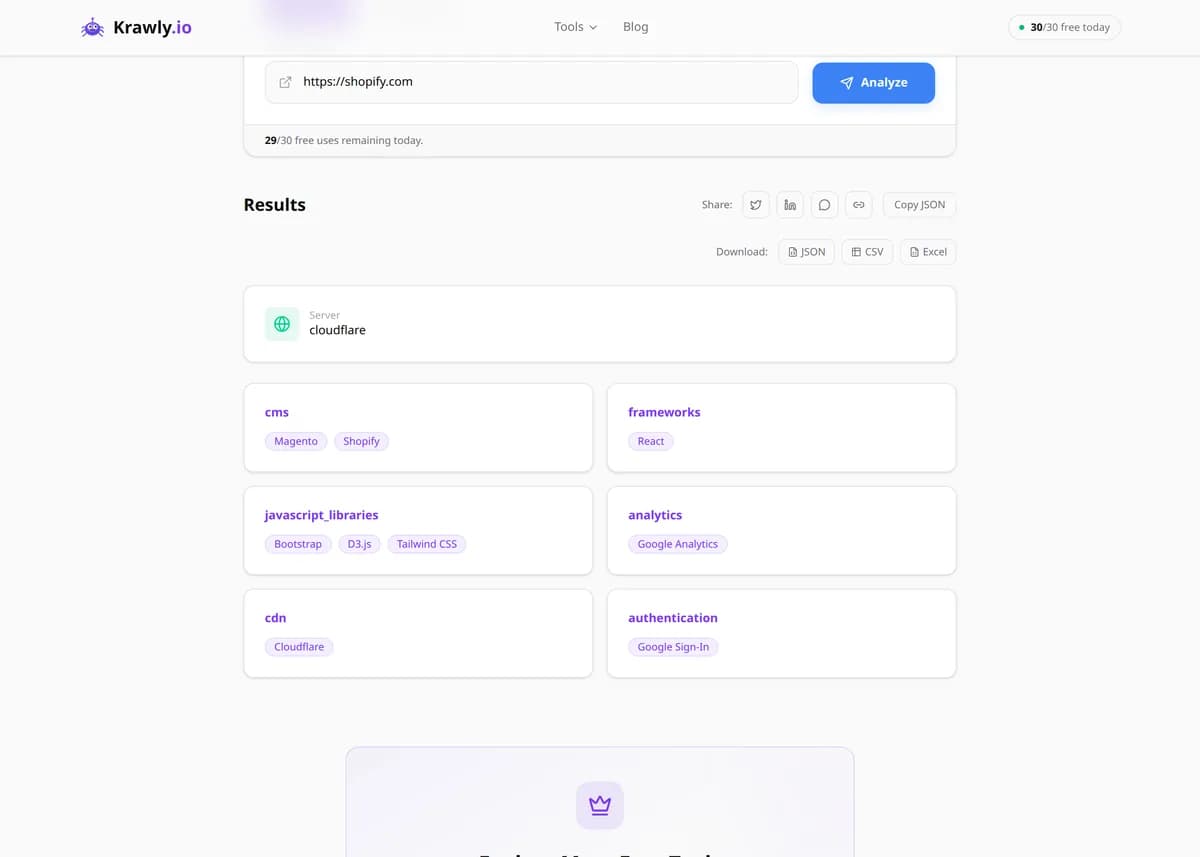
Paste a URL and the Technology Detector fetches the page, then matches HTTP response headers, HTML markup, inline script signatures, global JavaScript variables, meta generator tags, and known asset paths against a library of technology fingerprints. In seconds it returns the CMS, frameworks, CDN, analytics, hosting, and third-party widgets the site runs — the same intelligence a paid tool sells, with no browser extension and no login. Multi-URL mode lets you profile a whole list of prospects or competitors in one run.

Updated Krawly Editorial TeamIn-house engineers, writers & reviewers

Example output

Pre-computed real result from running Technology Detector against https://github.com

Identifies the technology stack behind any public site — CMS, JavaScript frameworks, analytics, CDN, e-commerce platform, hosting provider, and more.

CDN
Fastly + GitHub edge
JS framework
Primer / React
Server
GitHub.com
Analytics
Custom (no Google Analytics detected)
TLS
ECDSA, TLS 1.3
Detected technologies
12

What this tells you: Great for competitive analysis — paste a competitor's URL and learn the entire stack they use in under 5 seconds.

↓ Run the tool below with your own input
Explore More Free Tools

Discover 150+ free tools for web scraping, SEO analysis, OSINT, and more. 30 free uses every day — no signup required.

150+ Free Tools No Signup Required JSON / CSV / Excel 30 Uses / Day
Quick answer

Paste a URL and the Technology Detector fetches the page, then matches HTTP response headers, HTML markup, inline script signatures, global JavaScript variables, meta generator tags, and known asset paths against a library of technology fingerprints. In seconds it returns the CMS, frameworks, CDN, analytics, hosting, and third-party widgets the site runs — the same intelligence a paid tool sells, with no browser extension and no login. Multi-URL mode lets you profile a whole list of prospects or competitors in one run.

What is Technology Detector?

The Technology Detector fingerprints the full software stack running behind any public website — the CMS or e-commerce platform (WordPress, Shopify, Magento), the JavaScript framework (React, Vue, Next.js), the web server and CDN, analytics and marketing tags (Google Analytics, Meta Pixel, HubSpot), font and CSS libraries, and payment or chat widgets. It works entirely server-side by fetching the page and inspecting the evidence a browser would receive, so you get a Wappalyzer-style breakdown without installing an extension. It's a core tool for competitive intelligence, sales qualification, and lightweight security reconnaissance.

How to use Technology Detector

  1. 1

    Enter the website URL

    Paste the full URL of the homepage or any inner page. The homepage usually loads the most third-party tags, but a checkout or blog page can reveal payment processors and comment systems the homepage hides.

  2. 2

    Run the scan

    The tool fetches the page once and analyzes the raw response — headers, HTML, and referenced scripts — the same evidence a browser sees on first load, before any user interaction.

  3. 3

    Read the categorized results

    Technologies are grouped by category (CMS, JavaScript framework, analytics, CDN, hosting, etc.). Focus on the categories relevant to your goal — the framework for engineering recon, the marketing tags for sales intelligence.

  4. 4

    Batch-scan your list

    Switch to Multiple URLs mode and paste your prospect or competitor list to profile them in one pass, then export the results to filter or score them in a spreadsheet.

Try it when you need to…

  • Try it when you have a list of 200 companies and only want to email the ones already using a platform your product integrates with
  • Try it when a competitor's site feels unusually fast or personalized and you want to know exactly which CDN and A/B testing tools power it
  • Try it when scoping a security review and you need to know the CMS and library versions before deciding where to probe

Use cases

  • Sales qualification — filter a prospect list to only sites running Shopify Plus, HubSpot, or a competitor's product before you reach out
  • Competitive teardown — see which analytics, A/B testing, and personalization stack a rival uses to power their funnel
  • Security recon — spot an outdated jQuery version or an abandoned plugin that signals a soft target before a pen test
  • Agency migration scoping — document a client's existing CMS, tag manager, and CDN before quoting a replatform
  • Market research — sample hundreds of sites in a vertical to measure real-world adoption of React vs Vue or Cloudflare vs Fastly

Key features

Detects 100+ technologies across CMS, frameworks, CDN, analytics, hosting, and widget categories
Multi-signal fingerprinting — headers, HTML, inline scripts, JS globals, meta tags, and asset paths
Confidence indicators so you can weigh a strong header match against a weaker heuristic guess
Multi-URL bulk mode for profiling entire prospect or competitor lists at once
Runs entirely online — no browser extension, no software to install

Tips & best practices

Fingerprinting is evidence-based, not omniscient. A match on a meta generator tag or a /wp-content/ path is near-certain; a match on a generic minified bundle is a heuristic guess. Treat single weak signals as leads, not facts.

Server-side and backend languages are mostly invisible. Unless the server leaks an X-Powered-By or Server header (many now strip these deliberately), the tool can't see PHP, Python, or the database — it reports what the client receives, not what runs in the datacenter.

Sites behind Cloudflare, Akamai, or a reverse proxy often mask the origin server and rewrite headers, so the CDN can hide the true hosting provider. If hosting matters, cross-check with a DNS/WHOIS lookup on the apex domain.

Tag managers muddy the picture. Google Tag Manager or Segment can inject analytics and pixels dynamically after load, so a single server-side fetch may under-report the marketing stack compared to a live browser session that executes all the JavaScript.

Frequently asked questions

It fetches the page and matches multiple signals against a fingerprint database: HTTP response headers (Server, X-Powered-By, Set-Cookie names), HTML patterns and class names, inline and referenced script signatures, global JavaScript variables, meta generator tags, and known asset paths like /wp-content/ or /_next/. Combining several signals is what makes a detection reliable.

Only when the server reveals them. Some backends leak headers like X-Powered-By: PHP/8.1 or Server: nginx, and those are reported. But many production servers deliberately strip these headers, and databases or application languages that never touch the response stay invisible — the tool sees the client-facing evidence only.

It provides the same kind of client-side fingerprinting without a browser extension or account. Wappalyzer and BuiltWith maintain much larger commercial fingerprint libraries and historical databases, so use them when you need exhaustive coverage or trend history; use this tool for fast, free, one-off or bulk profiling.

Three common reasons: the technology loads only after user interaction or via a tag manager that a single fetch doesn't trigger; the site strips identifying headers and fingerprints; or the vendor updated their code so the old signature no longer matches. Absence of a detection is not proof of absence.

Yes — switch to Multiple URLs mode and paste a list. The tool profiles each site and returns a combined report you can export, which is the fastest way to score a prospect list or benchmark a competitive set.

Yes. Everything analyzed is publicly transmitted to any visitor who loads the page — headers, HTML, and scripts. Reading and categorizing that public response is no different from viewing source. As always, don't use the intelligence to attempt unauthorized access to systems you don't own.