Analysis Free · no signup

SEO Analyzer

Analyze SEO metadata, Open Graph, headings, content metrics and get a score.

Paste any public URL and the SEO Analyzer crawls the page in real time, returning a comprehensive audit of meta tags, Open Graph/Twitter Card data, heading hierarchy, image alt coverage, word count, keyword density, schema markup, canonical tags, and on-page linking. Every issue is scored and ranked by impact — fix the red items first and you'll see measurable ranking improvements within weeks.

Updated Enis GetmezFounder & Lead Engineer

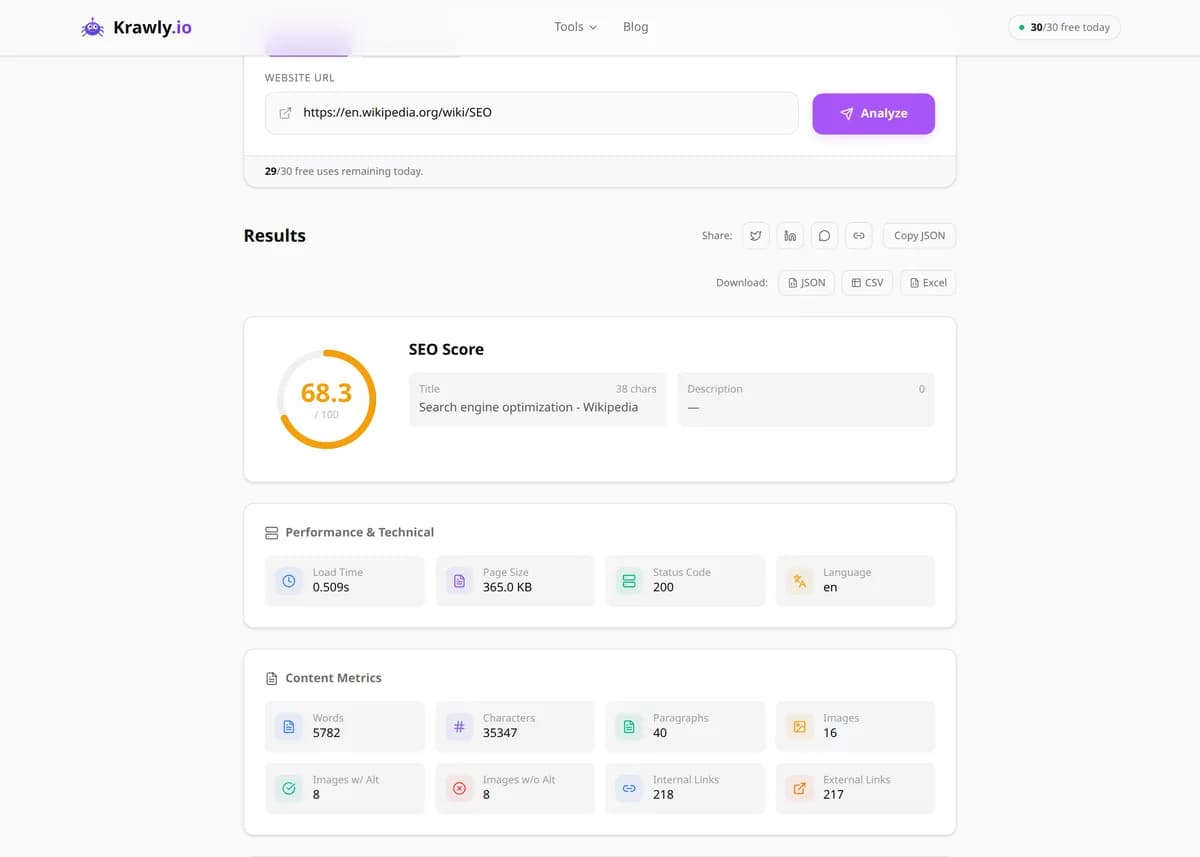
Example output

Pre-computed real result from running SEO Analyzer against https://example.com

On-page audit of a single URL — title, meta, OG, headings, alt text, word count, internal & external links, schema, and an overall 0-100 score.

SEO score
62 / 100
Title length
14 chars (too short)
Meta description
Missing
H1 tags
1 (ok)
Images without alt
0 of 0
Internal links
1
Word count
30 (very thin)

What this tells you: example.com is intentionally a stub page, which makes it a useful illustration of how the tool flags thin content. On a real site you would see 50–500 word counts and a much fuller link graph.

↓ Run the tool below with your own input
Explore More Free Tools

Discover 160+ free tools for web scraping, SEO analysis, OSINT, and more. 30 free uses every day — no signup required.

160+ Free Tools No Signup Required JSON / CSV / Excel 30 Uses / Day
Quick answer

Paste any public URL and the SEO Analyzer crawls the page in real time, returning a comprehensive audit of meta tags, Open Graph/Twitter Card data, heading hierarchy, image alt coverage, word count, keyword density, schema markup, canonical tags, and on-page linking. Every issue is scored and ranked by impact — fix the red items first and you'll see measurable ranking improvements within weeks.

What is SEO Analyzer?

The SEO Analyzer is a free online SEO audit tool that performs a comprehensive technical and on-page analysis of any webpage in seconds. It checks 25+ ranking factors including meta tags, Open Graph data, Twitter Cards, heading structure (H1-H6), image alt texts, canonical URLs, robots directives, word count, keyword usage, schema.org markup, and internal/external linking. It then generates an overall SEO score (0-100) with prioritised, actionable recommendations. Unlike paid tools that lock advanced checks behind subscriptions, every factor is shown for free, no login required.

How to use SEO Analyzer

  1. 1

    Paste the page URL

    Enter the full URL you want to audit — your homepage, a blog post, a product page, or a competitor's landing page. The tool fetches the live HTML and runs every check on it.

  2. 2

    Review the overall score

    The 0-100 SEO score summarises the page's health at a glance. 80+ means you're in good shape; below 60 flags significant issues that are likely costing you rankings.

  3. 3

    Fix red items first

    The report lists issues grouped by severity. Missing H1, missing meta description, and broken canonicals are high-impact fixes. Knock them out and re-run the audit.

  4. 4

    Audit multiple pages in bulk

    Toggle Multiple URLs mode and paste up to 10 URLs, one per line — useful for auditing a whole category or comparing against competitors in one run.

  5. 5

    Export and share

    Download the full report as JSON or CSV to share with your team, attach to client deliverables, or track score changes over time.

Try it when you need to…

  • Audit a newly-launched page before inviting Google to crawl it
  • Benchmark your SEO against 3-5 competitors in the same SERP
  • Find missing H1 tags, meta descriptions, and OG images across a section
  • Spot broken canonical URLs that split ranking power across duplicate pages
  • Diagnose why a page that ranks well on keyword research refuses to climb

Use cases

  • SEO audits — check any page for issues and improvements
  • Competitor analysis — compare your SEO against competitors
  • Content optimization — ensure pages meet SEO best practices
  • Client reporting — generate SEO reports for stakeholders
  • Pre-launch checks — verify SEO before publishing new pages

Key features

Comprehensive meta tag analysis (title, description, keywords)
Open Graph and Twitter Card validation
Heading structure and hierarchy check
Image alt text audit
Multi-URL support for bulk SEO analysis
Overall SEO score with actionable recommendations

Tips & best practices

Always compare against the top 3 ranking pages for your target keyword — not against SEO "best practices" alone. The SERP tells you what Google currently rewards.

A high SEO score won't save thin or low-quality content. After fixing technical issues, invest in 1500+ word in-depth copy with real expertise signals (E-E-A-T).

Re-audit after every major update — a CMS upgrade, theme switch, or content rewrite can silently break your canonicals or meta tags.

Frequently asked questions

An SEO score above 80 is considered good. Above 90 is excellent. Scores below 60 indicate significant issues that are likely suppressing your rankings. The score weights high-impact factors (title, description, H1, canonical) more heavily than cosmetic ones.

The SEO Analyzer focuses on on-page SEO factors (content, markup, metadata). For page speed and Core Web Vitals, use our Page Speed Analyzer or Google PageSpeed Insights alongside this tool.

Yes — toggle Multiple URLs mode and paste up to 10 URLs, one per line. The tool analyses them in parallel and returns a comparison-ready report.

Paid tools add backlink databases, keyword rankings tracking, and competitor domain metrics. This tool focuses on what you can audit in real time without a subscription — on-page factors and technical SEO. Use both: paid tools for strategy, this one for per-page diagnosis.

It diagnoses issues; you fix them. Fixing the flagged issues is known to move rankings — but always in combination with quality content, site authority (backlinks), and user engagement signals.