Analysis Free · no signup

Website Comparison

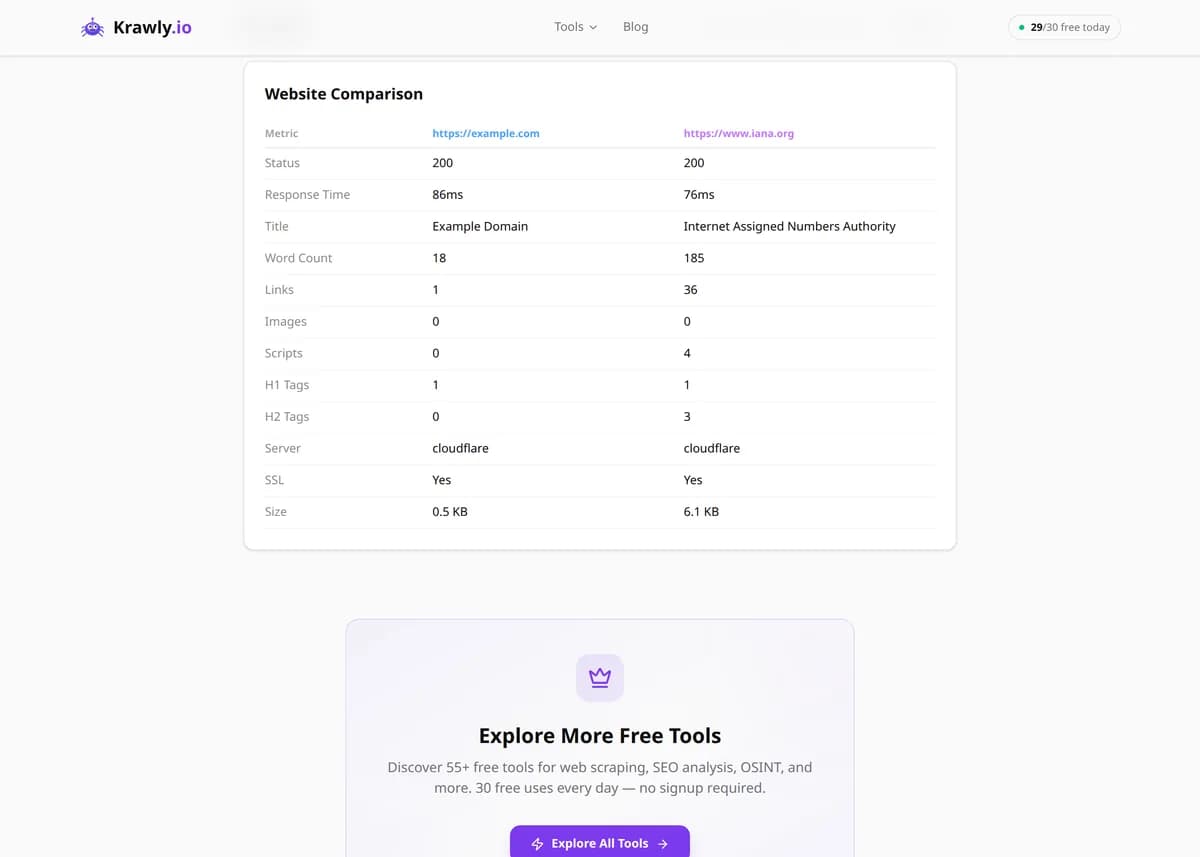
Compare two websites side by side: speed, structure, SEO elements, and content metrics.

Enter two URLs separated by ||| and the tool fetches both pages, times each response, and extracts their structural and SEO metrics into a side-by-side table. You instantly see which page loads faster, which has more content, and how their titles, meta descriptions, and heading structures differ — the raw signals behind why one might outrank or out-convert the other. It's the fastest way to benchmark your page against a competitor or measure a redesign against the version it replaced.

Updated Krawly Editorial TeamIn-house engineers, writers & reviewers
Explore More Free Tools

Discover 150+ free tools for web scraping, SEO analysis, OSINT, and more. 30 free uses every day — no signup required.

150+ Free Tools No Signup Required JSON / CSV / Excel 30 Uses / Day
Quick answer

Enter two URLs separated by ||| and the tool fetches both pages, times each response, and extracts their structural and SEO metrics into a side-by-side table. You instantly see which page loads faster, which has more content, and how their titles, meta descriptions, and heading structures differ — the raw signals behind why one might outrank or out-convert the other. It's the fastest way to benchmark your page against a competitor or measure a redesign against the version it replaced.

What is Website Comparison?

The Website Comparison Tool fetches two web pages at once and lays their key metrics side by side — server response time, page and content size, HTML structure, and on-page SEO elements like titles, meta descriptions, and heading counts. Instead of opening two tabs and eyeballing the differences, you get a single aligned report that makes the gaps obvious. It's built for competitive benchmarking, before-and-after checks around a redesign, and quick SEO comparisons between your page and the one outranking it.

How to use Website Comparison

  1. 1

    Enter both URLs

    Type the two pages you want to compare, separated by three pipe characters (site1.com|||site2.com). Compare like with like — a homepage against a homepage, a product page against a product page — so the metrics are meaningful.

  2. 2

    Run the comparison

    The tool fetches both pages, timing each request, and parses their HTML in parallel so you get an apples-to-apples snapshot taken moments apart rather than hours apart.

  3. 3

    Read the aligned metrics

    Response time, size, and SEO fields sit in matching rows for each URL. Scan down the column and the differences jump out — the page with the tighter title or heavier content is immediately obvious.

  4. 4

    Act on the gaps

    Turn the biggest deltas into a to-do list: if the competitor's page is faster and has a fuller meta description, those are your first two fixes. Re-run after changes to confirm you closed the gap.

Try it when you need to…

  • Try it when a competitor consistently outranks you for a keyword and you want a concrete list of on-page differences to close
  • Try it right after a redesign to confirm the new page didn't get heavier, slower, or lose its meta tags versus the version it replaced
  • Try it when a client insists their page is 'as good as' a market leader's and you need side-by-side evidence of the gaps

Use cases

  • Competitive benchmarking — put your page next to the one ranking above you and see exactly where it's stronger
  • Redesign validation — compare the new version of a page against the old one to confirm you didn't regress speed or content depth
  • SEO gap analysis — check whether a rival's title, meta description, and heading structure is more optimized than yours
  • Performance triage — quickly see which of two pages responds slower before diving into a full speed audit
  • Client reporting — show a client a clean side-by-side of their page versus a market leader to justify recommended changes

Key features

Fetches and compares two pages in a single run
Server response time measured for each URL so you can spot the faster host
Content metrics — page size, text volume, and element counts side by side
Structure comparison of the HTML — heading counts, links, and images
On-page SEO elements aligned: title, meta description, and heading hierarchy

Tips & best practices

Response time from a single fetch is one sample, not a benchmark. Network jitter, cold caches, and CDN edge routing all move the number, so a 200ms difference on one run may vanish on the next. Compare the pages a few times before concluding one host is genuinely slower.

This is a static server-side comparison, so it measures the raw HTML response — not the fully-rendered, JavaScript-hydrated experience. A JS-heavy page can look lean here yet feel slow to a real user once its bundles execute. Pair the comparison with a real-browser speed test for the full picture.

More content isn't automatically better SEO. A page with 3,000 words may be padding; a tighter 1,200-word page can rank higher if it matches search intent more precisely. Use the content-size delta as a prompt to read both pages, not as a verdict.

Compare pages that serve the same intent and template. Benchmarking your blog post against a competitor's category page produces noise — the structural differences reflect page type, not quality. Match homepage to homepage and article to article for signal that means something.

Frequently asked questions

Separate the two URLs with three pipe characters — for example, site1.com|||site2.com. The tool splits on that delimiter, fetches each page independently, and returns their metrics in matching side-by-side columns.

Server response time for each page, content metrics like page size and text volume, HTML structure such as heading and link counts, and on-page SEO elements including the title tag, meta description, and heading hierarchy. It's a structural and SEO snapshot rather than a visual diff.

It's a single-sample measurement of how long the server took to return the HTML on that one request, which is useful for rough comparison but sensitive to network jitter and caching. For a rigorous speed verdict, run it a few times or use a dedicated page-speed tool that measures real-browser rendering.

No. It compares measurable metrics — timing, size, structure, and SEO fields — not the rendered appearance. If you need a visual before-and-after, capture each page with a screenshot tool and compare the images.

Yes, and that's one of its main uses. Enter your URL and the competitor's, and the side-by-side view shows where they're stronger on speed, content depth, or SEO markup so you can prioritize what to fix.

Not necessarily. Larger content can mean more depth or just more padding, and a bigger page size can actually hurt performance. Treat the deltas as signals to investigate — read both pages and match them against search intent rather than assuming higher numbers are better.